Semantic Translator
Introduction
Semantic interoperability is the ability of different applications and business partners to exchange data with unambiguous, shared meaning. As a result, data analysis and knowledge discovery can be done on a federation of systems.
The aerOS Semantic Translator (ST) component enables semantic translation of RDF data (messages). At its core ST builds on a considerably enhanced version of the INTER-IoT Inter-Platform Semantic Mediator (IPSM) and ASSIST-IoT Semantic Translation Enabler.
The translation performed by ST is based on alignments and uses a deployment-specific modularized central ontology. In the IoT domain, for example, the core modules describing, e.g. devices, observations can be based on GOIoTP (Generic Ontology of IoT Platforms) that is a meta-data reference data model. Additionally, any domain specific module can be included, e.g., medical ontology, logistic ontology. However, central ontology can be any ontology that can serve as a central data model. It is not directly used to configure ST but should be considered when defining alignments that are used for ST configuration. Additionally, any domain specific module can be included e.g. medical ontology, logistic ontology.
Concepts and features
Alignments
To define (and consequently perform) semantic translation, ST needs the concept of alignment. The alignment is a set of correspondences between simple entities or complex structure from source and target ontologies. It contains rules for transformation between input and output RDF graphs. Specifically, ST translates RDF graph named payload (that is part of the message send to ST). Alignments are parts of ST instance configuration, and are used directly to execute translation. Semantic translation always constitutes application of two alignments - one from source ontology to central ontology, the other from central ontology to target ontology.
The following figure shows a sample situation with four artifacts (P1-4). Each with it’s own ontology (O1-4). The central ontology contains modules g1…gn. The two-way communication requires preparation of two alignments: (i) from artifact’s ontology to central ontology e.g. A1G, (ii) from central ontology to artifact’s ontology e.g. AG1. Each alignments contains correspondences between ontology modules that are required for this part of communication.
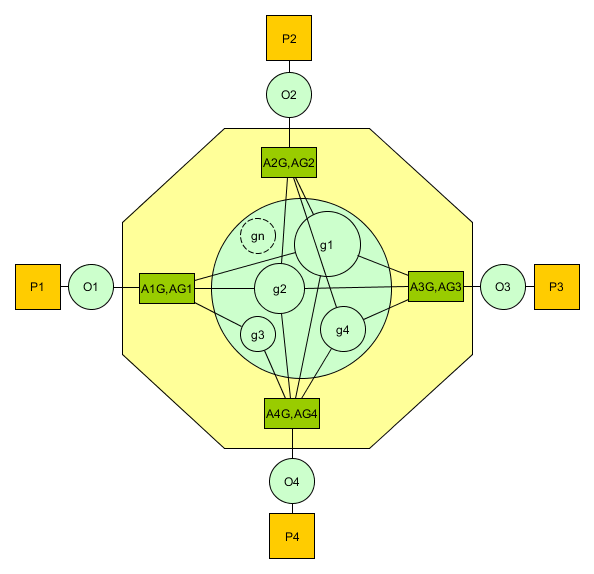
Overview of translation with central modularized ontology
To achieve semantic interoperability between two artifacts:
instantiate modular central ontology;
select/define artifact’s ontologies: create from scratch or use one of existing tools;
align semantics between ontology of each artifact and central ontology (set of alignments);
implement syntactic translators;
configure ST — upload alignments and create translation channels.
The following figure shows a process of sending a message from source to target artifact that needs to be semantically and syntactically translated.
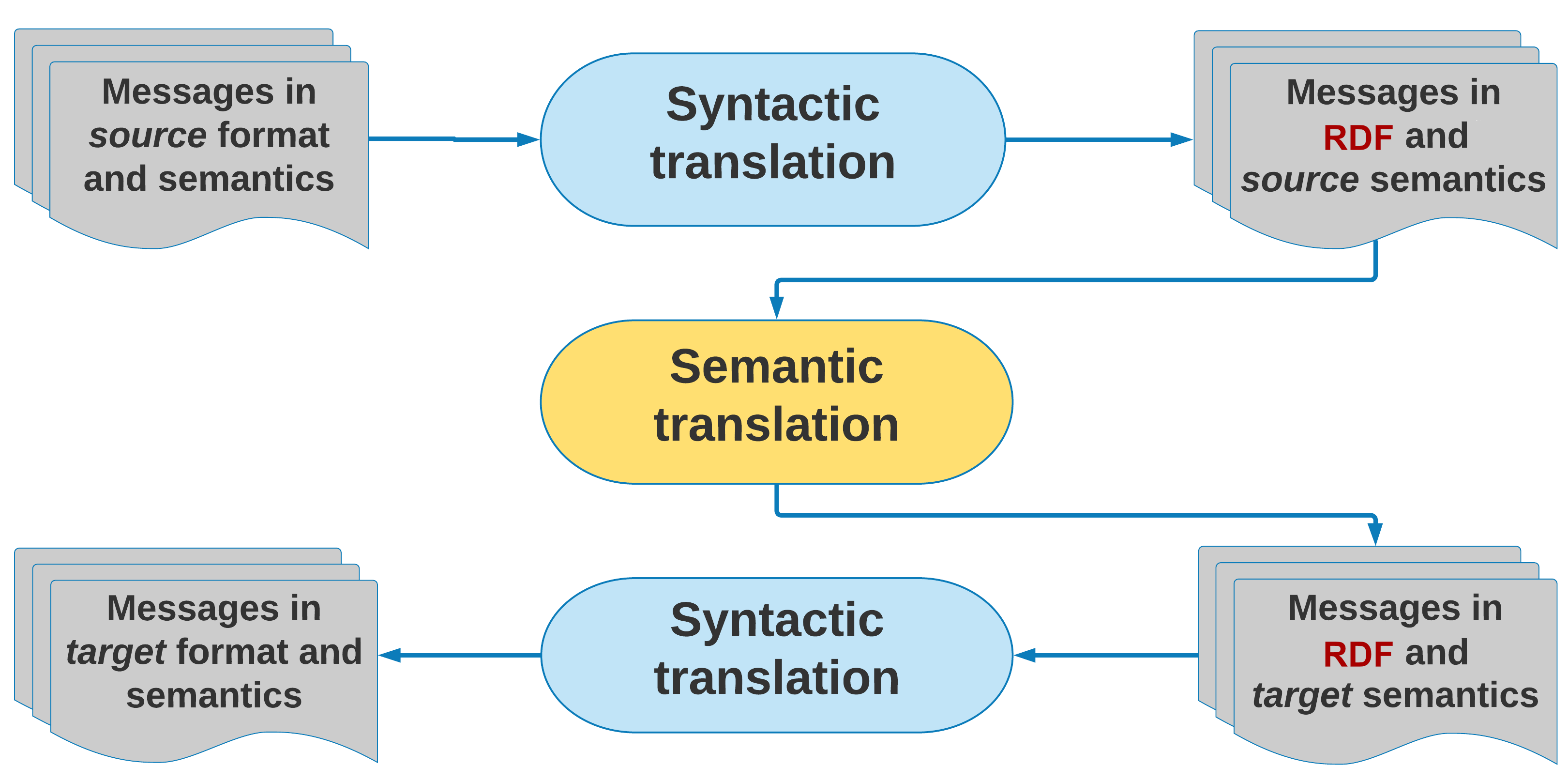
Process overview
The message originates at source artifact in it’s format and semantics e.g. XML message with respect to XML Schema. To use ST the message needs to be transformed to RDF with source artifact’s semantics. This stage is called “syntactic translation”. In fact, when ST is to be used in a standalone mode (without other aerOS tools), syntactic translation can be implemented via an arbitrary component that will “prepare” input for semantic translation. Note that, conversion to RDF may not be necessary, when artifacts already have communication based on RDF. When a source artifact does not support semantics, an RDF represantation of data exchanged with the ecosystem needs to be proposed.
When the message arrives at ST, the RDF named graph payload is translated with respect to configuration of the semantic translation channel (cf. architecture overview). Usually two alignments are applied, however ST can be configured with special predefined IDENTITY alignment that does not change the graph. Another remark here, is that ST follows the rule: translate only what can be translated, leave the rest as it was. The resultant message is expressed in RDF with semantics corresponding to target semantic of last applied alignment.
This message can be feed into another syntactic translator that will transform it’s format to e.g. JSON cosidering target artifact’s semantics. Another possible scenario is that there are applications consuming data in RDF and central semantics. In such case, second syntactic translation is not necessary.
Central ontology
Central ontology is not directly used by ST, but it needs to be established for a given ST deployment, to enable construction of consistent alignments. It should be modularized, so that alignments can be created to and from selected modules, e.g. meteorological, logistic events, depending on the context of “conversation”.
Specifically, there is no need to align the whole data models if an artifact that needs to be connected to the ecosystem exchanges only messages related to a specific “spect” e.g. meteorological observation data.
For IoT-centric applications the central ontology can be based on GOIoTP ontology, extended by appropriate domain specific modules.
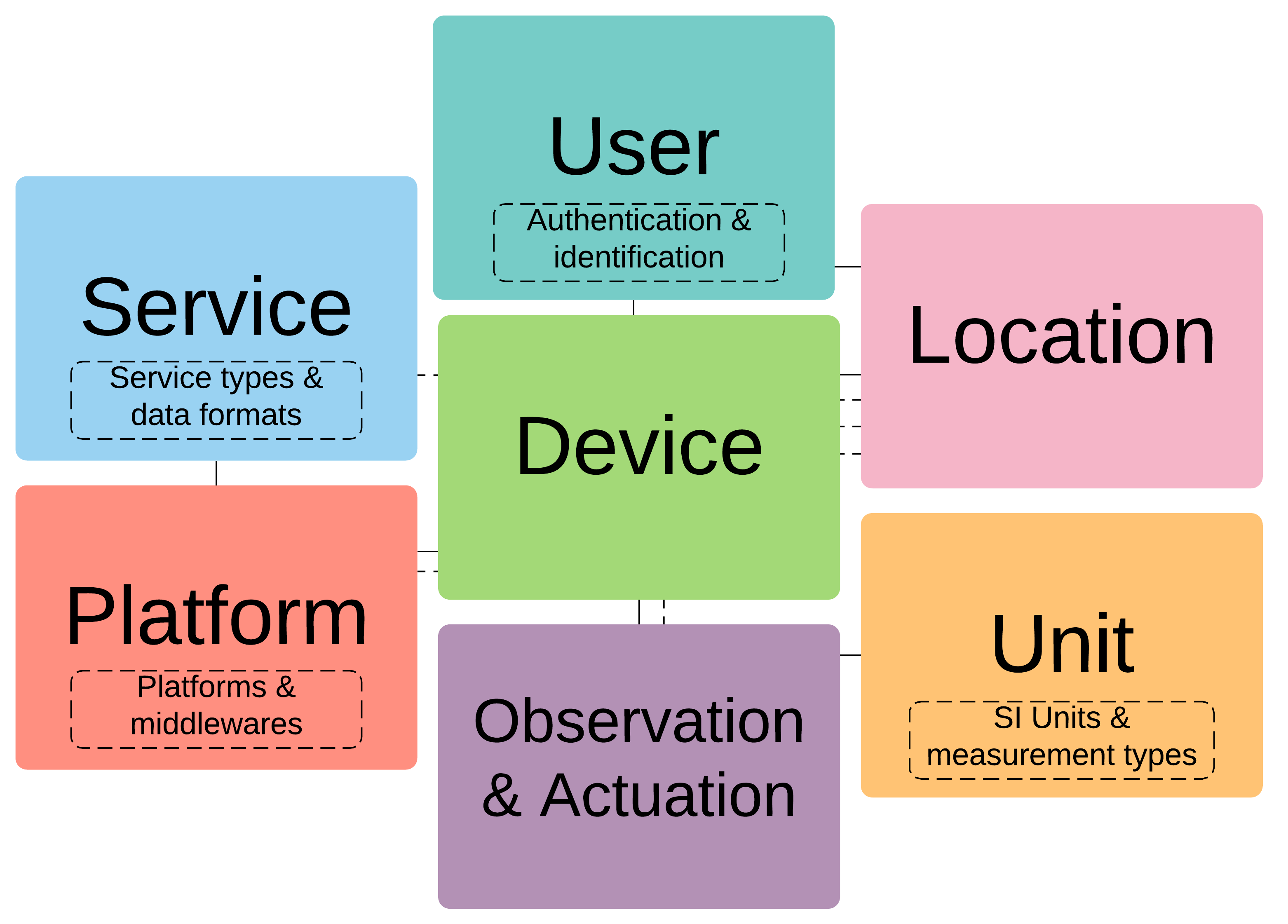
GOIoTP and GOIoTPex – IoT-dedicated central ontology modules
In general case, central ontology can be any aribitrary ontology, since this does not influence the semantic translation engine provided by ST. However, semantic engineer preparing the deployment should keep in mind that:
central ontology should cover all “topics” of conversations in platforms ecosystem
it should be clear enough to enable querying and reasoning done directly on it
it should contain subject-specific modules that can be independently maintained and versioned (for easier change management)
Translation process
ST is a component for performing semantic translation that can be use in a standalone mode or in combination with other aerOS components and application-specific tools. It has a REST interface for configuration, and both publish-subscribe and REST interfaces for translation. Supported message broker infrastructures that follow publish-subscribe paradigm are Apache Kafka and MQTT.
Configuration includes:
Uploading alignment files that define the translation rules
Defining semantic translation channels - each channel is defined with input and output topic names, identifiers (name and version) of input and output alignments
Additionally, the following operations are possible:
List all uploaded alignments
Delete alignment identified by name and version
Retrieve alignment identified by name and version
List created translation channels
Delete channel identified by id
Performing semantic translation means sending input RDF message, and receiving output RDF message. Client can publish message to input topic of semantic translation channel, and consume message from output topic of semantic translation channel.
Another possibility is to use REST API for performing a synchronous semantic translation. Here, client in a request sends input RDF graph, and a sequence of alignments that should be applied. The response contains translated RDF graph.
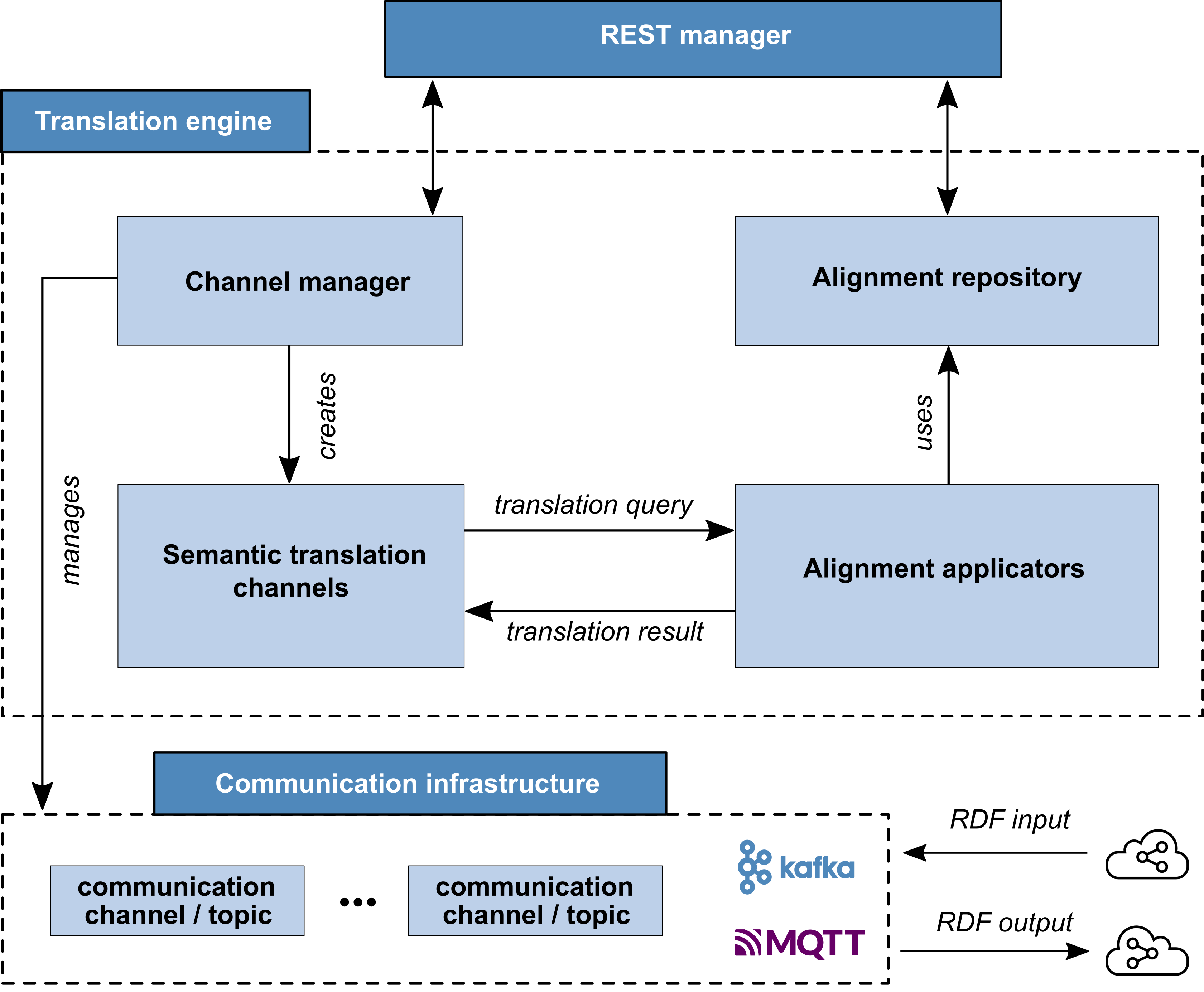
Semantic Translator – general architecture
Remarks
ST can perform translation between any pair of RDF graphs. The translation can be direct or composed from multiple alignments depending on the context. In a typical IoT platforms integration case, we use Central Ontology (CO) so that the translation has two steps: translate from source semantics to CO and translate from CO to target ontology. As a result, integration of a new platform into the ecosystem means preparing alignments to and/or from CO (depends on requirement for one- or bi-directional communication requirement).
Direct translation means that only one alignment is applied that defines mappings between source and target semantics. To configure ST to act in this way a translation channel should be defined that has as input alignment defined alignment and as output IDENTITY alignment (not changing the RDF graph). Direct translation with REST API means specifying a sequence of alignments to be applied consisting of only one alignment.
Composed translation means applying more than one alignment. In pub-sub approach, by default two alignments are used. In REST-based translation an arbitrary alignments sequence can be specified.
Note that in each case, the translation process should be handled by one semantic translation channel. By default, a translation channel is configured with two alignments that are applied sequentially.
Place in architecture
The aerOS Semantic Translator can be utilized as a “standalone” tool – whenever RDF homogenization or translation is required. ST is also an important “internal” building block for defining/creating heterogeneous semantic pipelines within the aerOS Data Fabric product.
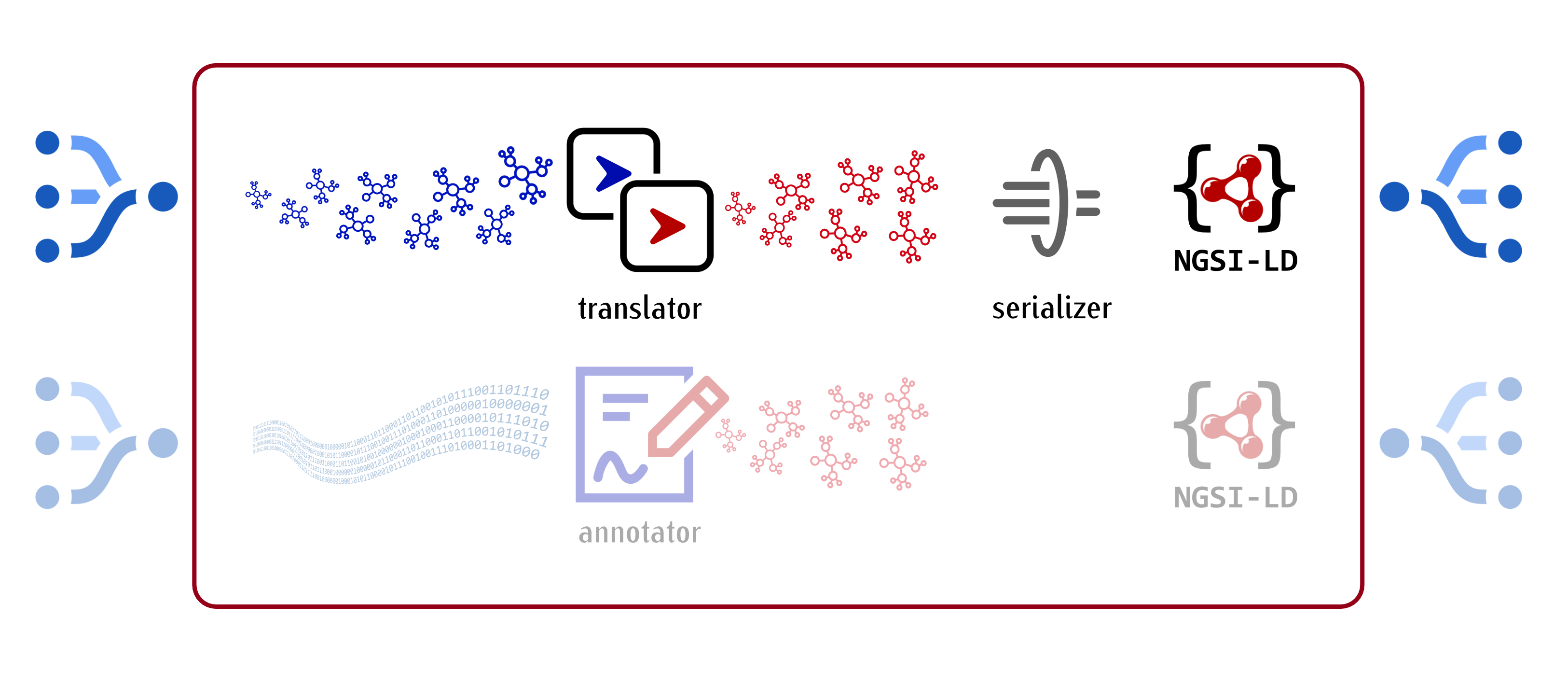
Semantic Translator as sematic pipelines building block
User guide
The process of semantic translation is performed by ST based on the configuration of translation channel (using Apache Kafka or MQTT publish-subscribe mode) or sequence of alignments received via REST request (using REST API).
The steps element in an alignment defines in what order cells of the alignment are to be used. Each cell is applied to the RDF graph being an output of the application of the previous cell. Internally, ST converts cell applications into SPARQL UPDATE queries. These are generated from “graph patterns” expressed by entity1 and entity2.
Lets know analyze step by step an example of transformation of one predefined RDF graph into another.
Let the input RDF be (using the Turtle serialization):
[] a port:Element ;
  port:haslatitude "26.94442"^^xsd:float ;
  port:haslongitude "19.29351"^^xsd:float ;
  port:hasmeteoStationId "2"^^xsd:int ;
  port:hasname "P.Felipe" .
with the following binding of prefixes:
@prefix geo: <http://www.opengis.net/ont/geosparql>.
@prefix iiot: <http://inter-iot.eu/GOIoTP>.
@prefix iiotex: <http://inter-iot.eu/GOIoTPex>.
@prefix ogis: <http://www.opengis.net/def/sf/>.
@prefix port: <http://inter-iot.eu/syntax/WSO2Port>.
@prefix rdf: <http://www.w3.org/1999/02/22-rdf-syntax-ns#>.
@prefix sosa: <http://www.w3.org/ns/sosa/>.
@prefix var: <http://www.inter-iot.eu/sripas:node_>.
@prefix xsd: <http://www.w3.org/2001/XMLSchema#>.
Alignment cell given below, contains RDF graph patterns that generate correspondences (translation rules) that “match” any meteo station registration message, and produce its counterpart, expressed in terms of the GOIoTPex ontology.
<align:Cell rdf:about="&sripas;1_meteo_stations">
    <align:entity1 rdf:datatype="&xsd;string">
        var:elem a port:Element ;
            port:haslatitude var:lat ;
            port:haslongitude var:long ;
            port:hasmeteoStationId var:id ;
            port:hasname var:name .
    </align:entity1>
    <align:entity2 rdf:datatype="&xsd;string">
        var:station a vp:MeteoStation, iiot:IoTDevice, sosa:Sensor ;
            iiotex:hasLocalId var:id ;
            iiot:hasName var:name ;
            iiot:hasLocation [
                a iiot:Location ;
                geo:asWKT var:geopos
            ] .
    </align:entity2>
    <align:relation>=</align:relation>
    <sripas:transformation rdf:parseType="Literal">
        <function about="STR">
            <param order="1" about="&var;id"/>
            <return about="&var;sid"/>
        </function>
        <function about="CONCAT">
            <param order="1" val="&meteo;"/>
            <param order="2" about="&var;sid"/>
            <return about="&var;id_uri"/>
        </function>
        <function about="IRI">
            <param order="1" about="&var;id_uri"/>
            <return about="&var;station"/>
        </function>
        <function about="STR">
            <param order="1" about="&var;lat"/>
            <return about="&var;slat"/>
        </function>
        <function about="STR">
            <param order="1" about="&var;long"/>
            <return about="&var;slong"/>
        </function>
        <function about="CONCAT">
            <param order="1" val="Point("/>
            <param order="2" about="&var;slat"/>
            <param order="3" val=" "/>
            <param order="4" about="&var;slong"/>
            <param order="5" val=")"/>
            <return about="&var;geopos"/>
        </function>
    </sripas:transformation>
    <sripas:filters rdf:parseType="Literal">
        <filter about="&var;lat" datatype="&xsd;float"/>
        <filter about="&var;long" datatype="&xsd;float"/>
        <filter about="&var;slat" datatype="&xsd;string"/>
        <filter about="&var;slong" datatype="&xsd;string"/>
    </sripas:filters>
    <sripas:typings rdf:parseType="Literal">
        <typing about="&var;geopos" datatype="&ogis;wktLiteral"/>
    </sripas:typings>
</align:Cell>
The sample message, when matched against the pattern from entity1, establishes appropriate “variable bindings,” that are subsequently utilized/referenced in entity2, transformation, and filters sections of the cell. The structure of the RDF graph of the message together with the “variable bindings” can be “graphically” represented as:
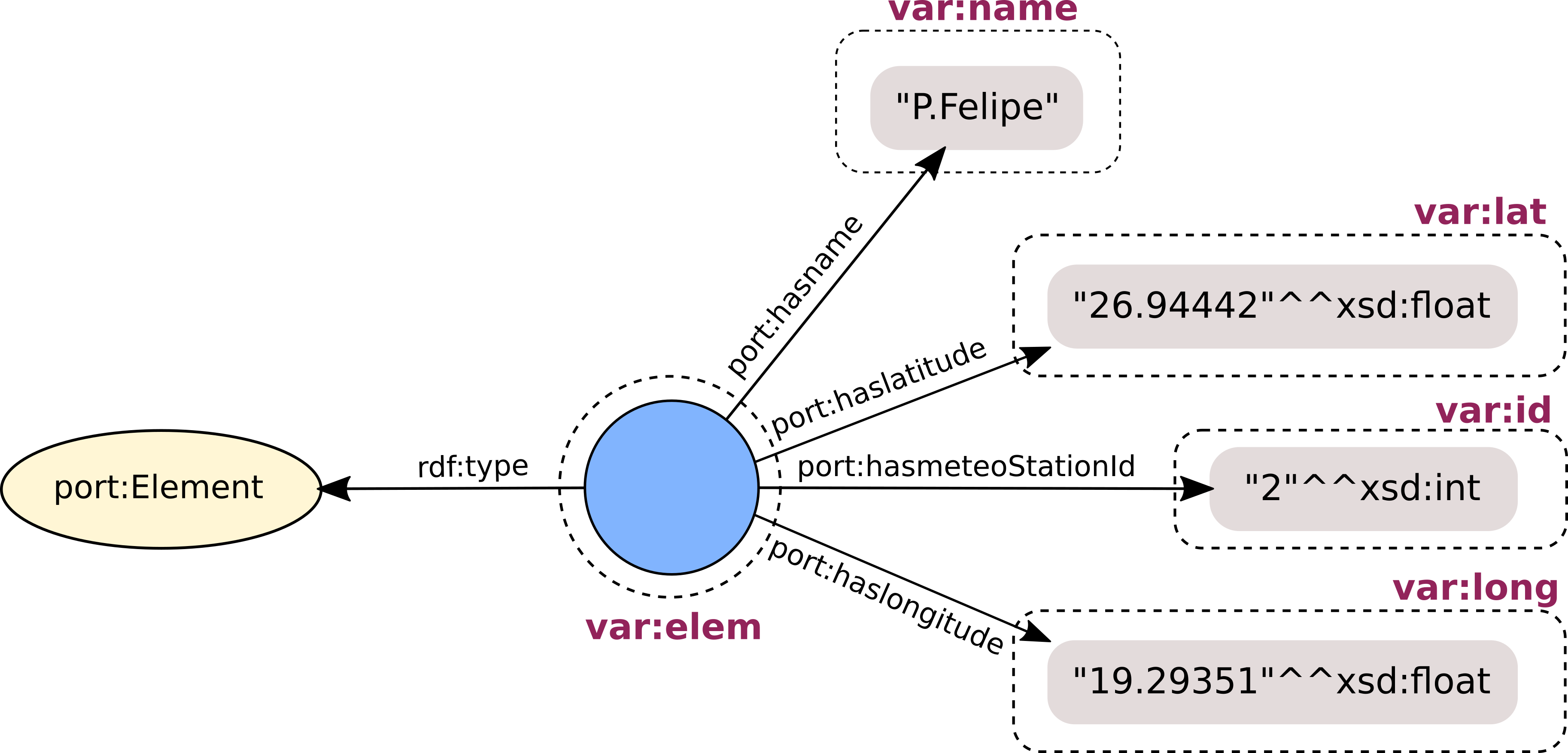
RDF input graph with “bindings” produced by the alignment cell
Because of the structure of the RDF graph pattern from entity2, and the created variable bindings, an instance of vp:MeteoStation, iiot:IoTDevice, and sosa:Sensor needs to be generated from the value that was matched by the var:id variable. This way, a numerical property of a blank node, representing a meteo station in the source data, is translated into an identifier (URI) of an entity representing the station in the target ontology. Therefore, in transformations sections, functions are called to cast it into string (STR), concatenate it with proper prefix (CONCAT), and generate the URI (IRI). The result is stored in the var:station variable that is referenced in the graph pattern from entity2. The source port:hasname property is mapped to the iiot:hasName property from the target (central) ontology.
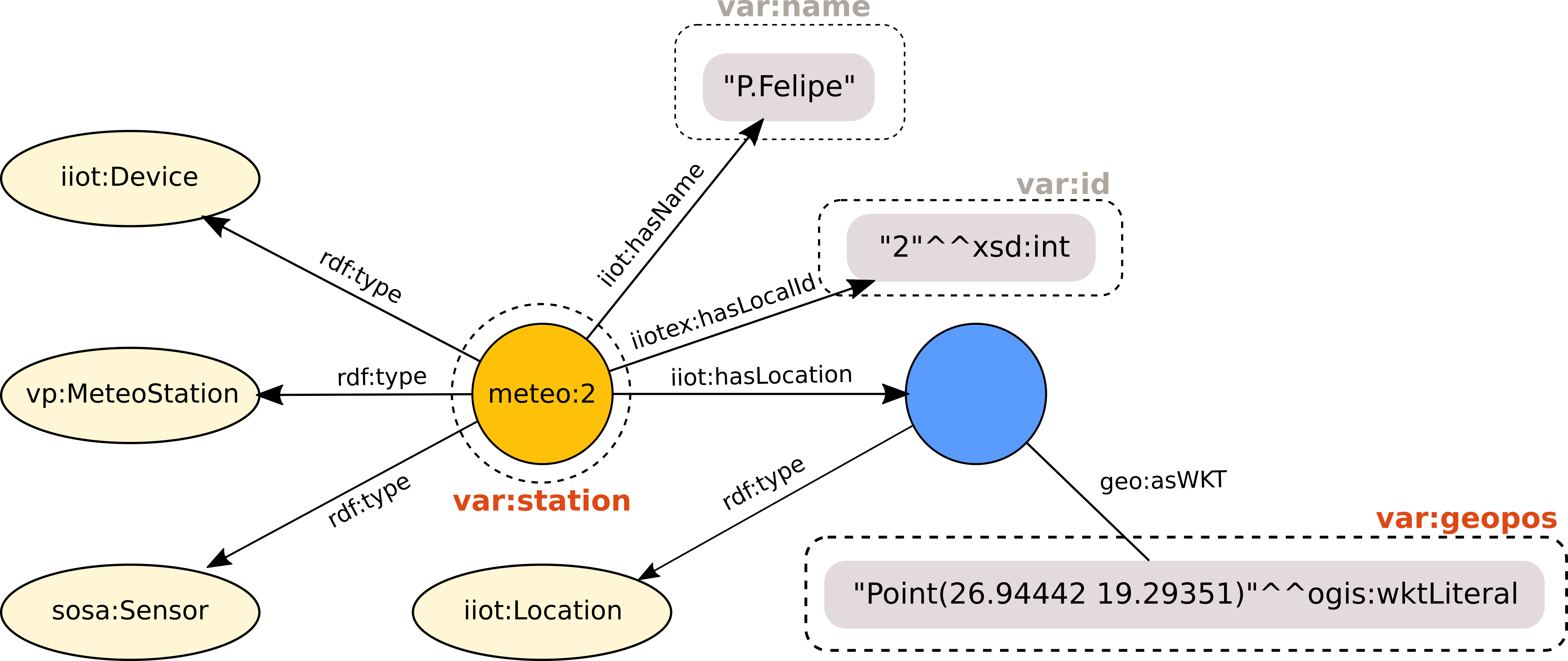
The RDF graph after the translation
Installation
Building Docker image
The only tool needed for compilation of the code is SBT. All dependencies of the project will be automatically downloaded when SBT will be invoked for the first time.
To create a Docker image containing the latest version of the Semantic Translator, the user, from the SBT command prompt, needs to issue the command
docker
The command assumes that Docker is available on the develpment machine, and that the user has sufficient provileges to use it.
The resulting image will be available from the local Docker registry under the name aeros-project/semantic_translator:n.n.n, where n.n.n represents the current version of the tool.
The list of locally available images should be similar to:
user@machine:~$ docker image ls
REPOSITORY                         TAG           IMAGE ID            CREATED             SIZE
aeros-project/semantic_translator  1.0.0         2a2587804717        1 minute ago        295MB
Configuration options
Semantic Translator can be used as a standalone tool, offering translation via a REST interface. Streaming translation support, for both MQTT and Kafka message brokers, can be configured via suitable config parameters or environment variables.
Configuration parameters for the ST can be provided by setting the appropriate environment variables. For example, to change the port for the REST interface from the default 8080 to 8888
export SEMTRANS_REST_PORT="8888"
By default ST is configured to handle MQTT-MQTT channels only, which in terms of environment variable can be expressed as:
export SEMTRANS_BROKER_TYPES.0="MM"
To add Kafka-Kafka type channels handling the above configuration should be augmented as follows:
export SEMTRANS_BROKER_TYPES.0="MM"
export SEMTRANS_BROKER_TYPES.1="KK"
In order to configure a locally running MQTT broker as the source and sink for the messages the following set of environment variables can be used:
export SEMTRANS_MQTT_SRC_HOST="host.docker.internal"
export SEMTRANS_MQTT_SRC_PORT="1883"
export SEMTRANS_MQTT_TRG_HOST="host.docker.internal"
export SEMTRANS_MQTT_TRG_PORT="1883"
To configure Kafka (streaming) message broker for the ST
export SEMTRANS_KAFKA_HOST="host.decker.internal"
export SEMTRANS_KAFKA_PORT="29092"
The configuration parameters can also be set directly by editing the application.conf configuration file.
semtrans = {
  supported-channel-types = ["MM"] // MQTT-MQTT only – the default
  //  supported-channel-types = ["KK"] // Kafka-Kafka only
  //  supported-channel-types = ["MM", "KK"] // Both MQTT-MQTT and Kafka-Kafka
  supported-channel-types = ${?SEMTRANS_BROKER_TYPES}
  db-sqlite {
    driverClassName = org.sqlite.JDBC
    jdbcUrl = "jdbc:sqlite:/data/ipsm.sqlite"
  }
  http {
    port = "8080"
    port = ${?SEMTRANS_REST_PORT}
    host = "0.0.0.0"
    host = ${?SEMTRANS_REST_HOST}
  }
  mqtt {
    messageSizeLimitInKB = 256
    messageSizeLimitInKB = ${?SEMTRANS_MQTT_MSG_SIZE}
    source {
      host = "host.docker.internal"
      host = ${?SEMTRANS_MQTT_SRC_HOST}
      port = 1883
      port = ${?SEMTRANS_MQTT_SRC_PORT}
    }
    target {
      host = "host.docker.internal"
      host = ${?SEMTRANS_MQTT_TRG_HOST}
      port = 1883
      port = ${?SEMTRANS_MQTT_TRG_PORT}
    }
  }
  kafka = {
    host = "host.docker.internal"
    host = ${?SEMTRANS_KAFKA_HOST}
    port = 29092
    port = ${?SEMTRANS_KAFKA_PORT}
  }
}