LDAP Collector
Introduction
The LDAP Collector is a component of the aerOS Data Fabric that allows the ingestion of LDAP data so that they can be included in the knowledge graph.
Features
It connects to an LDAP server, retreives information of users, roles, groups and organizations and, with some processing, dynamically generates a JSON object with all this information.
According to data definitions in the aerOS Project, these LDAP data are considered of batch type, so the translation to RDF triples is done by Morph-KGC given the appropriate mappings file.
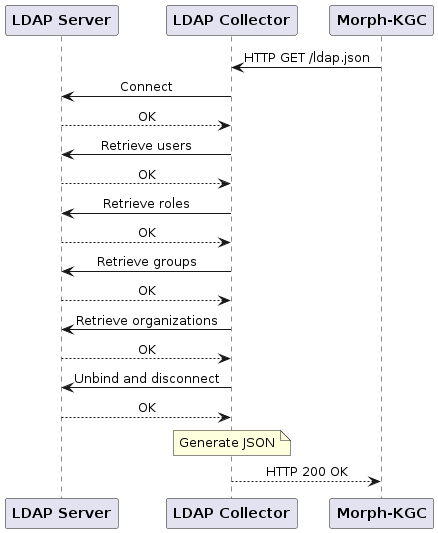
The working principle of the LDAP Collector is depicted in the sequence diagram below. The LDAP Collector exposes a REST API with a GET method that is called by Morph-KGC. Once the call is received, the LDAP Collector connects to an LDAP server and fetches information for the organization, its users, roles and groups. Once this information is collected, and after doing some processing, it generates a JSON output that is returned in response. Morph-KGC then uses this JSON to generate RDF triples according to the mapping rules.
The inclusion of these LDAP data into the knowledge graph defines a data product pipeline. A representation of this pipeline can be seen in the following diagram.

Installation
The LDAP Collector is meant to be run as a Docker container. Its deployment can be done:
By using Docker Compose.
By using a Kubernetes manifest/descriptor file.
By installing a Helm Chart.
The LDAP Collector will be servicing HTTP GET /ldap.json requests on port 63300 (TCP).
Building the Docker image
Clone the repository, open it in a terminal tab or window and execute the following command:
$ sudo docker build -t aeros-project/ldap-collector:latest .
Alternatively you can pull the latest pre-built Docker image from aerOS’s Container Registry:
# Use the credentials (user/password) provided here: https://gitlab.aeros-project.eu/aeros-public/common-deployments
$ sudo docker login registry.gitlab.aeros-project.eu -u <user> -p <password>
$ sudo docker pull registry.gitlab.aeros-project.eu/aeros-public/common-deployments/ldap-collector:latest
Docker Compose
If you choose to deploy the LDAP Collector using Docker Compose, you can define the service using the following directives:
ldap-collector:
    image: registry.gitlab.aeros-project.eu/aeros-public/common-deployments/ldap-collector:latest
    hostname: ldap-collector
    container_name: ldap-collector
    ports:
        - "63300:63300"
    environment:
        - LDAP_ORGANIZATION_DN=dc=example,dc=com
        - LDAP_SERVER_ENDPOINT=ldap://openldap:389
        - LDAP_USE_SSL=False
        - LDAP_USER=cn=admin,dc=example,dc=com
        - LDAP_PASSWORD=aeros
        - LDAP_CONN_MAX_RETRIES=5
        - LDAP_CONN_TIMEOUT=5
Kubernetes manifest/descriptor file
First, create a Kubernetes secret to authenticate with aerOS’s Container Registry:
# Use the credentials (user/password) provided here: https://gitlab.aeros-project.eu/aeros-public/common-deployments
$ kubectl create secret docker-registry aeros-common-deployments --docker-server=registry.gitlab.aeros-project.eu --docker-username=<user> --docker-password=<password>
Then, download and deploy the manifest in the Kubernetes cluster:
# Downloading the manifest:
$ wget --header "PRIVATE-TOKEN: glpat-S247U1KuYykMWwwgwKqx" https://gitlab.aeros-project.eu/api/v4/projects/65/packages/generic/ldap-collector/2.0.4/ldap-collector.yaml

# Deploying the manifest:
$ kubectl apply -f ldap-collector.yaml
To delete the deployment, run:
$ kubectl delete -f ldap-collector.yaml
Helm Chart
First, add aerOS’s Helm Repository:
# Use the credentials (user/password) provided here: https://gitlab.aeros-project.eu/aeros-public/common-deployments
$ helm repo add --username <user> --password <password> aeros-common https://gitlab.aeros-project.eu/api/v4/projects/65/packages/helm/stable
Once added, install the Helm Chart:
$ helm install ldap-collector aeros-common/ldap-collector
To uninstall the Helm Chart, run the following command:
$ helm uninstall ldap-collector
Configuration
The LDAP Collector is configured using the following environmental variables.
Variable |
Description |
Default value |
|---|---|---|
|
LDAP DN of the organization to retieve information from. |
|
|
URI where the LDAP server is listening from incoming connections or requests. FORMAT: |
|
|
Whether or not to use SSL for the connection with the server. |
|
|
LDAP DN of the user for connecting with the server and retrieving information. |
|
|
Password of the user for connecting with the server and retrieving information. |
|
|
Maximum number of retries while trying to establish a connection with the LDAP server. |
|
|
Time (in seconds) to wait between retries while trying to establish a connection with the LDAP server. |
|
When using Docker Compose or the Kubernetes manifest file, edit the values of the environmental variables accordingly.
When using the Helm Chart, create a values.yaml file to override the default values of the environmental variables:
envVars:
    - name: LDAP_ORGANIZATION_DN
      value: "dc=example,dc=com"
    - name: LDAP_SERVER_ENDPOINT
      value: "ldap://openldap:389"
    - name: LDAP_USE_SSL
      value: "\"False\""
    - name: LDAP_USER
      value: "cn=admin,dc=example,dc=com"
    - name: LDAP_PASSWORD
      value: "aeros"
    - name: LDAP_CONN_MAX_RETRIES
      value: "5"
    - name: LDAP_CONN_TIMEOUT
      value: "5"
Once created, use helm upgrade to update the Helm installation with your desired values.
License
Apache-2.0 License.
Notice (dependencies)
The LDAP Collector is implemented as a containerized Python application that leverages the ldap3 library as well as FastAPI/Uvicorn to provide its functionality.