Self-configurator
Introduction
The self-configurator component offers a flexible configuration management solution that helps handling the heterogeneity of hardware and software resources, and the dynamic nature of aerOS-based environments.
To achieve this, the component utilizes an abstract representation of a resource configuration and its evolution. The representation encapsulates the key details of the state in a manner that is agnostic to the specificity of individual components, and allows to track state changes.
Features
The self-configurator architecture is designed to allow defining and managing a high-level representation of the state of resources, and provides an abstract layer to handle their complexity and diversity. The proposed architecture is generic, and applicable to a wide range of scenarios, offering an effective support for autonomous configuration management.
Configurations are abstract structures, expressed in terms of functionalities, resources, actions, and reactions. Here, functionalities model essential capabilities of resources, that are to be configured. Self-configurator allows for each functionality to declare what resources it needs/requires to be properly configured. The distinction between resource and functionality may seem arbitrary, but, practically speaking, changes to a resource will notify the system via an action, and potentially trigger a reaction, whereas changes to functionality will not.
The reaction, allows the self-configurator to flexibly respond to changes in available resources, by adjusting the configuration state. The reactions are expressed via rules, describing how the system should behave when a specific event occurs. In particular, reactions can emit notifications, enabling the system to proactively adapt to ongoing changes. Note also that the abstract representation of system configuration allows the self-configurator to manage a wide range of resources, from simple sensors to complex hardware/software components.
To deal with the potentially huge variety of resources, self-configurator utilizes the concept of a connector as an abstraction for the resource communication interface.
Place in architecture
The following figure presents the self-configurator component as one of the optional self-* modules inside the IE.

User guide
From the users’ point of view, the self-configurator supports two kinds of interfaces, utilizing HTTP endpoints and Apache Kafka channels. The HTTP API is used for administrative tasks, such as adding or removing instances of the classes RequirementsModel and ReactionModel. Kafka, on the other hand, provides a scalable and reliable means for real-time communication with resources managed by the self-configurator. These interfaces ensure seamless communication within the system, which is vital for maintaining, and adapting, configurations in response to the changes in the environment.
Let us consider a (rather simplistic) smart home management system, in which a number of components can be identified, e.g. (a) security system with cameras and thermal scanners, (b) thermostats controlling air conditioners and underfloor heating, and (c) local computer handling network and system controls. All these components have unique operational needs and configurations.
Now, in the event of a power outage, for example, the backup battery may not be able to support all devices. As a result, a decision must be made to keep some functions operational while shutting down others. To ensure security and communication with the outside world, for instance, requires keeping the cameras and network infrastructure operational. Making this decision, however, necessitates a complete understanding of (i) current system configuration, (ii) dependencies between different components, proper prioritization, and (iii) consequences of changing their states (interdependence).
For instance, it can be assumed that the requirements model depends on the security module, which, in turn, depends on the cloud security provider. If the smart home requirement model is updated with an exclusive dependency on the cloud security provider (with removeDangling option enabled), then as a “side effect” the security module would be removed from the set of requirements.
For example, to define a simple requirement model, one can issue the following HTTP POST request:
POST /requirements-model

{
  "id" : "smart_home_functionality",
  "labels" : { },
  "requirements" : [
    {
      "id" : "wide_view_cam",
      "exclusive" : false
    },
    {
      "id" : "thermostat_functionality",
      "exclusive" : false
    }
  ],
  "weight" : 2.0
}
Internally, this request will be deserialized as a RequirementsModel and (with proper “wrapping”) sent to SystemConfigBehavior.
First, the RequirementsModelAdded event will be persisted, resulting in a change of the state of SystemConfigBehavior (from EmptyState to WithRequirements). Then a message will subsequently be published on the “requirements met” Kafka topic and an appropriate acknowledgment will be returned to the original sender.
In order to define a simple reaction model, one would send a POST request to another endpoint
POST /reaction-model

{
  "reactionId" : "reaction_1",
  "filterExpression" : {
    "messageType" : "ResourceIsAvailable",
    "id" : "wide_view_cam"
  },
  "action" : {
    "requirements" : [
      {
        "id" : "smart_home_functionality",
        "labels" : { },
        "requirements" : [
          {
            "id" : "wide_view_cam",
            "exclusive" : false
          }
        ],
        "weight" : 2.0
      }
    ]
  }
}
The reaction will be triggered when a Resource with identifier wide_view_cam becomes available. The reaction will replace any existing set of RequirementsModel, with those defined in the requirements field. Effectively, it will simplify the existing smart_home_functionality to require only Resource, or RequirementsModel, with wide_view_cam identifier. After deserializing from JSON into ReactionModel, it will be passed to SystemConfigBehavior.
Installation
The most strightforward way to istall the self-configurator is to utilize its Dockerized image and suitably adapt docker-compose-local.yml file provided in the official source code repository. Alternatively, if Kubernetes environment is required, one can use the Helm chart, also supplied as a part of the official code repository.
Configuration options
Environment variables
KAFKA_SERVER– network address of the Apache Kafka message broker used by the self-configurator (default:localhost:29092)REQUIREMENTS_MET_TOPIC– name of a Kafka topic where messages notifying users if requirements for a specific reaction are met (default:requirement-met-topic)RESOURCES_TOPIC– name of a Kafka topic used for sending messages that describe changes in the satus of resources (default:resources-topic)
API
Requirements
This interface consists of two endpoints for creating and deleting requirements:
POST {root}/requirements-model

{
  "id" : String,
  "labels" : LabelMap,
  "requirements" : [FunctionalityRequirement],
  "weight" : Number
}
DELETE {root}/requirements-model/{requirement_id}
Example:
POST {root}/requirements-model

{
  "id" : "test1",
  "labels" : {
    "key1" : "value1"
  },
  "requirements" : [
    {
      "id" : "test2",
      "exclusive" : false
    },
    {
      "labelKey" : "key2",
      "labelValue" : "value2",
      "count" : 3,
      "exclusive" : true
    }
  ],
  "weight" : 3.0
}
Requirements JSON entities
LabelMap
A LabelMap is a mapping of label names to their values, used to
verify requirements. It has the following format:
{
  "label_name" : "label_value"
}
FunctionalityRequirement
This entity describes a requirement for specific functionality, represented by a requirements model. There are two types of requirements: id-based and label-based.
Id-based: Requires a resource with a specified
idto be available.
{
  "id" : "test2",
  "exclusive" : false
}
Label-based: Requires a resource with a specific label key and value to be available. The
countparameter specifies how many entities are needed.
{
  "labelKey" : "key2",
  "labelValue" : "value2",
  "count" : 3,
  "exclusive" : true
}
Both types include an exclusive parameter, which determines if the
resource or functionality can be shared with other requirements.
RequirementsModel
{
  "id" : String,
  "labels" : LabelMap,
  "requirements" : [FunctionalityRequirement],
  "weight" : Number
}
id(String): A unique identifier for the requirements model. Needs to be unique across requirements and resources.labels(LabelMap): A mapping of label names to their values, used for verifying the requirements. The format of aLabelMapis a JSON object with key-value pairs, where the key is the label name and the value is the label value.requirements(Array ofFunctionalityRequirement): An array of objects, which describe specific functionality requirements needed in the requirements model. EachFunctionalityRequirementcan either be id-based or label-based, and includes anexclusiveparameter to indicate if the resource or functionality can be shared with other requirements.weight(Number): A numeric value representing the weight (priority) of the requirements model.
Reactions
This interface consists of two endpoints for creating and deleting reactions:
POST {root}/reaction-model

{
  "reactionId": String,
  "filterExpression": FilterExpression,
  "action": ReactionAction
}
DELETE {root}/reaction-model/{reaction_id}
Reaction JSON entities
FilterExpression
Please note that filtering happens with messages that are incoming via Kafka. FilterExpression dictates when (or under what conditions) reaction should be triggered. There are six types of such expressions in total:
ResourceIsAvailablereaction will be triggered when resource with a specific id will be available.
"filterExpression": {
    "messageType": "ResourceIsAvailable",
    "id": "element-id-1",
}
ResourceIsNoLongerAvailablereaction will be triggered when resources with a specificidis no longer available.
"filterExpression": {
    "messageType": "ResourceIsNoLongerAvailable",
    "id": "element-id-1",
}
ResourceWithLabelIsAvailablereaction will be triggered when resource with specific label is available.
{
    "messageType": "ResourceWithLabelIsAvailable",
    "labelKey": "configuration_step",
    "labelValue": "not_configured"
}
ResourceWithLabelIsNoLongerAvailablereaction will be triggered when resource with specific label is no longer available.
{
    "messageType": "ResourceWithLabelIsNoLongerAvailable",
    "labelKey": "configuration_step",
    "labelValue": "not_configured"
}
AnyEventany event will trigger a reaction
{
    "messageType": "AnyEvent"
}
CustomMessageContentonly message with specific, predetermined content will be triggered.
{
    "messageType": "CustomMessageContent",
    "content": "fire"
}
Reaction will be triggered when following message will be sent via Kafka topic:
{
  "messageType": "RegisterResource",
  "content": "fire"
}
ReactionAction
This entity defines what action should be taken after an event was positively filtered by FilterExpression. There are six reactions
available:
SendSimpleKafkaMessagesends a message on specified Kafka topic:
{
  "message": "message",
  "topic": "topic"
}
Kafka message will have following format:
{
  "trigger": String,
  "content": String
}
ReplaceConfigurationcompletely replaces current set ofRequirementsModel.
{
  "requirements": [RequirementsModel]
}
UpsertConfigurationeither updates and/or inserts non-existing requirements. IfremoveDanglingis set to true, then it removesRequirementsModelthat are not directly mentioned in the request (as requirement or dependency).
{
  "requirements": [RequirementsModel],
  "removeDangling": Boolean
}
ConditionalActionwill either executeactionifconditionalCheckis met,fallbackotherwise.
{
  "conditionalCheck": Condition,
  "action": ReactionAction,
  "fallback": ReactionAction
}
KeepHighestWeightFunctionalitiesensures that requirements with highest weight are met given available resources.
"KeepHighestWeightFunctionalities"
NoActionself explanatory.
"NoAction"
ReactionModel
{
  "reactionId": String,
  "filterExpression": FilterExpression,
  "action": ReactionAction
}
Kafka interface - interaction
Kafka interface is able to consume three types of message.
RegisterResource
{
    "messageType": "RegisterResource",
    "resource": {
        "id": String,
        "labels": LabelMap
    }
}
DeregisterResource
{
  "messageType": "DeregisterResource",
  "resource": {
    "id": String,
    "labels": LabelMap
  }
}
CustomMessage
{
  "messageType": "CustomMessage",
  "content": String
}
The complete specification of the self-configurator REST API is also available via swagger.yaml file.
Developer guide
Technological Stack
Scala and Apache Pekko
The self-configurator component was developed using Scala programming language (version 3) and the SBT build tool. Among the main dependencies of the project are libraries coming from the Apache Pekko, Cats, and Circe projects.
Apache Kafka
Kafka is an open-source, distributed event streaming platform used by thousands of companies for high-performance data pipelines, streaming analytics, data integration, and mission-critical applications. Kafka’s high reliability seems like a good fit for internal component communication. Its large number of available connectors will also help with various analytical needs.
High-level architecture
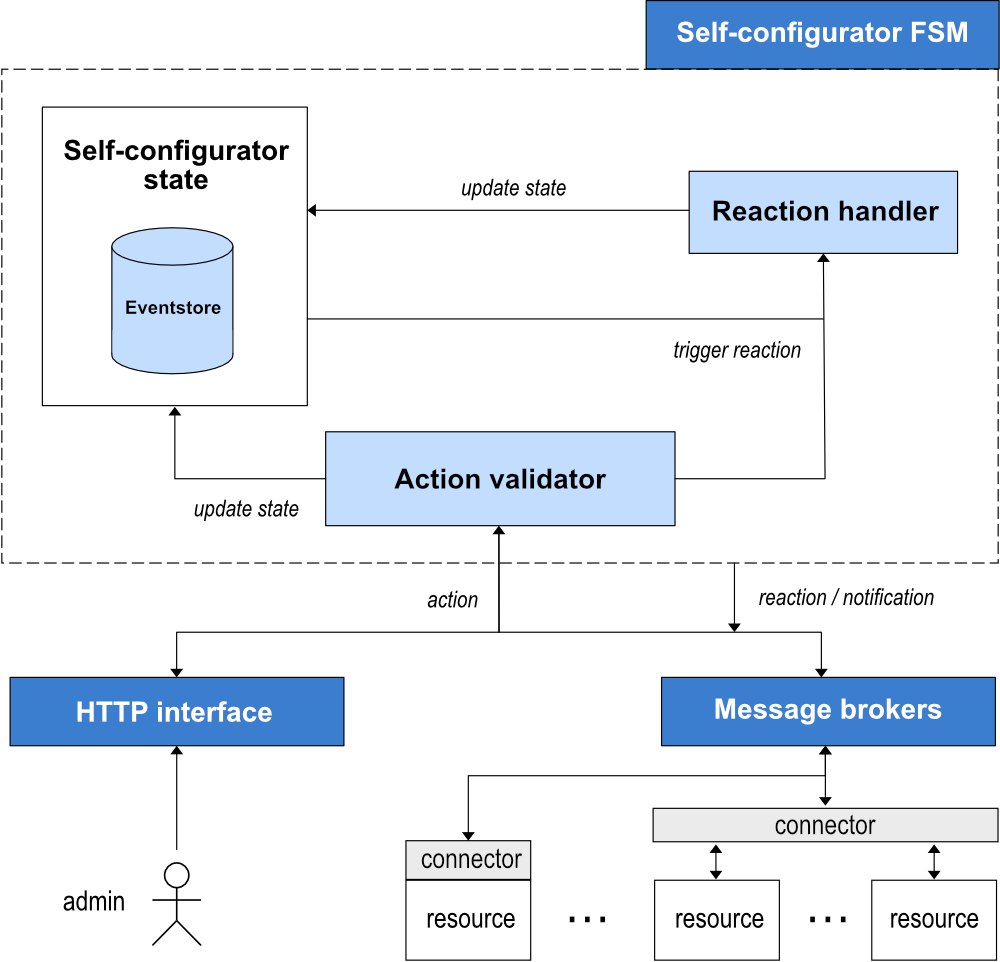
Self-configurator’s high-level architecture
SystemConfigBehavior
The core part of the self-configurator is the SystemConfigBehavior component responsible for persisting and managing system state. By storing a sequence of state-changing events, it supports accurate recovery of system status in the case of failures. It is implemented using persistent Finite State Machine (FSM).
The SystemConfigBehavior handles actions and reactions. Actions, representing external events, trigger predefined series of steps. Upon occurrence of an action, first, an internal validation process is initiated. It is based on the current state of the system, and generates an event if the action is deemed valid. The event, encapsulating the effect of the action, is then persistently stored, culminating in a state change. Moreover, reactions, signifying system operations in response to events, are orchestrated using Apache Pekko EventSourcedBehavior. These could range from modifications in the configuration, to transmission of messages to resources.
State Transition Model
The self-configurator’s FSM maintains system states, and tracks their dynamic evolution. The FSM can store three kinds of entities: Resource, RequirementsModel, and ReactionModel. In the process of parsing the configuration definition it also automatically validates that the relationships between requirements always form a DAG.
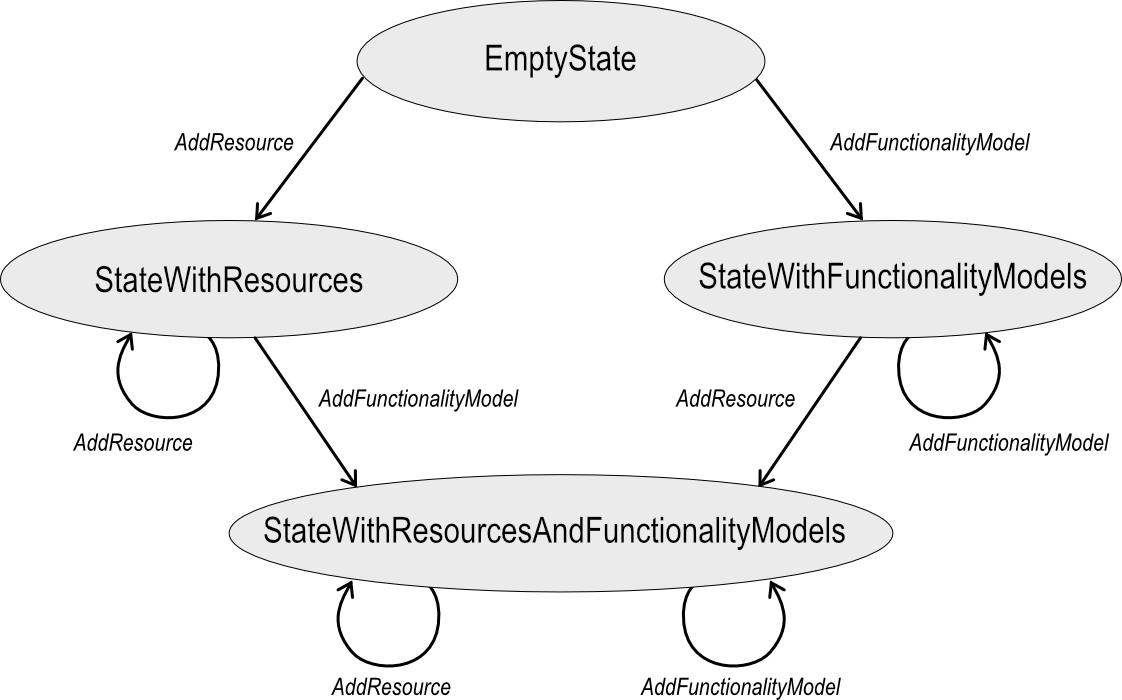
State transition diagram – managing resources and functionality models
Actions are the only way to communicate with the self-configurator, regardless of whether the request originates from the system administrator, a resource, or if it is a custom Kafka message. Each action is mapped to the Command type parameter for Apache Pekko EventSourcedBehavior.
The following pairs of actions (prefixed with Add/Remove) are available: Resource, FunctionalityModel, and ReactionModel. Additional ones, i.e., ReplaceRequirements, UpsertRequirements, and CustomMessage allow handling requirements and “non-standard” messages, respectively. All actions implement the SystemConfigCommand trait.
Connectors
The question of how particular Resource can send messages to the self-configurator is abstracted via connector. It is Resource responsibility to be able to do that. The obvious drawback of this approach is that it requires more work from the user. The benefit, on the other hand, is that self-configuratior becomes more independent and reusable. We can easily imagine a repository of connectors that can be shared among users.
License
Self-Configurator code is released under the Apache License 2.0.