Self-optimisation
Introduction
The self-adaptation/optimization component is one of the self-* components responsible for analysing the IEs states in order to propose possible optimizations within the system. Its purpose is twofold. First, it aims to provide an early-detection mechanism that can help to prevent serious degradation of system’s performance. Second, it supports application of real-time adaptive sampling technique that can optimize the data dissemination in other self-* components.
The overall architecture of the self-adaptation/optimization is illustrated on the following diagram:
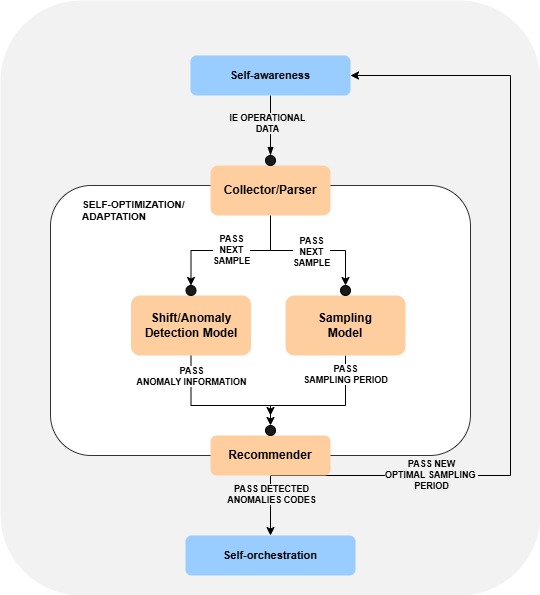
The component receives the information about current IE state (including, but not limited to CPU, RAM, disk usage and power consumption) from the self-awareness. This information is then parsed and passed to 2 separate models: Anomaly Detection Model and Sampling Model, where it is being processed and used to obtain recommendations. The recommendations indicate possible adaptations that can be applied within the system. They are passed to self-awareness and self-orchestrator components.
Anomaly Detection Model
Model is responsible for detecting different types of anomalies (e.g. rapid increase of CPU value). Currently, the model is composed of 3 sub-models:
CPU anomaly detection model
RAM anomaly detection model
Disk usage anomaly detection model
Underneath each of the models implements the same statistic-based algorithm for anomaly detection that uses the moving density of subsequent sample points in order to identify anomalies. The models separately process individual metrics of IE state and, upon the detection of anomalies, send encoded information to self-orchestrator.
Sampling Model
Model is responsible for proposing optimal sampling period to self-awareness. This information is separately computed for the retrieval of hardware information and power consumption.
In particular, it computes the optimal sampling period by estimating the distance between subsequent observations using probabilistic exponential moving average (PEWMA). Computed information is being passed to self-awareness.
Features
The component allows to:
Get information about available anomaly models (GET /anomaly/models)
Get information about parameters of selected model (GET /anomaly/parameters/{model_type})
Change the parameters of individual anomaly models (PUT /anomaly/parameters/{model_type})
- Get information about available sampling models (GET /sampling/models)
Note: 2 models are supported for estimating sampling period for monitoring hardware information and power consumption
Get information about parameters of selected model (GET /sampling/parameters/{model_type})
Change the parameters of individual sampling model (PUT /sampling/parameters/{model_type})
Perform analysis of IE state leading to anomaly detection and sampling period estimation (POST /optimize with IE data)
Perform analysis of IE power consumption leading to an estimation of sampling period (POST /optimize/powerConsumption)
For more information on how to use the project endpoints, you can see the Specification schema.
Place in architecture
The following figure describe the relationship between self-adaptation/optimization module and another self-* modules.

User guide
Technological Stack
The component was developed using the following technologies:
Development stack: Spring Boot 3 + Spring Framework 6
Test stack: JUnit 5
Prerequisities
To start using the _self-optimization_ module, please visit the Common deployments repository for more information.
The model by itself do not require deployment of other components first (i.e. deploying self-adaptation/optimization before the remaining components will not trigger any errors). It will automatically start to listen for the information from self-awareness and will be ready to process it whenever self-awareness is deployed.
For the complete communication, the component should be deployed within the IE of working self-awareness and self-orchestrator.
Installation
Configuration options
The necessary configuration is automatically provided within the module. To modify the default settings, update the application.yaml file located in the resources directory.
It supports standard options available with Spring Configuration.
Apart from that, the following parameters can be changed:
Sampling Model Properties
sampling.model-properties - parameters of sampling models:
type - name of the model (2 types supported: RESOURCE and ENERGY)
min-period - lower limit of sampling period (in milliseconds)
max-period - upper limit of sampling period (in milliseconds)
value-weight-factor - weighting factor used to decrease impact of old values
probability-weight-factor - weight put on the probability in computation of moving average (close to 0 = use EWMA)
imprecision - sensitivity of sampling period adjustment (close to 1 = adjustment in each model execution, close to 0 = no adjustments)
multiplicity - scaling factor of the estimated sampling period
Anomaly Detection Model Properties
anomalies.models-properties - parameters of anomaly detection models:
name - name of the model (must correspond to mapping function used to retrieve IE metrics)
toleranceThresholdAnomaly - weight used to control transition from normal to anomalous state
toleranceThresholdNormal - weight used to control transition from anomalous to normal state
windowAnomaly - minimal number of detected anomalous observations after which the model sends information about anomaly
windowNormal - minimal number of detected non-anomalous observations after which the model switches to normal state
This configuration can be set beforehand, but it is also available for modification at runtime using the endpoints mentioned in Features.
Environmental variables
AEROS_IE_IP - the IP of the IE where is running the self-awareness module.
Developer guide
Prerequisites for Local Development
To set up the development environment, ensure the following dependencies are installed:
Running Instructions (Local)
For local execution, using an IDE such as IntelliJ is recommended. However, the application can also be run from the console. Compile the project and install the required dependencies using Maven:
mvn clean package
Execute the compiled JAR file (latest version) with:
java -jar target/self-optimization-<version>.jar
Running Instructions (Docker)
To deploy the application using Docker, build and start a containerized instance with:
docker compose up -d