aerOS Federator
Introduction
The aerOS Federator serves as a management service responsible for controlling the establishment and maintenance of federation mechanisms among the multiple aerOS domains that form the IoT-Edge-Cloud continuum.
Features
This component is intended to provide an additional layer of automatization above Orion-LD to avoid direct interaction with the context brokers of the continuum when it comes to federation management, as well as federated backup mechanisms for federation critical data (e.g. domains registry).
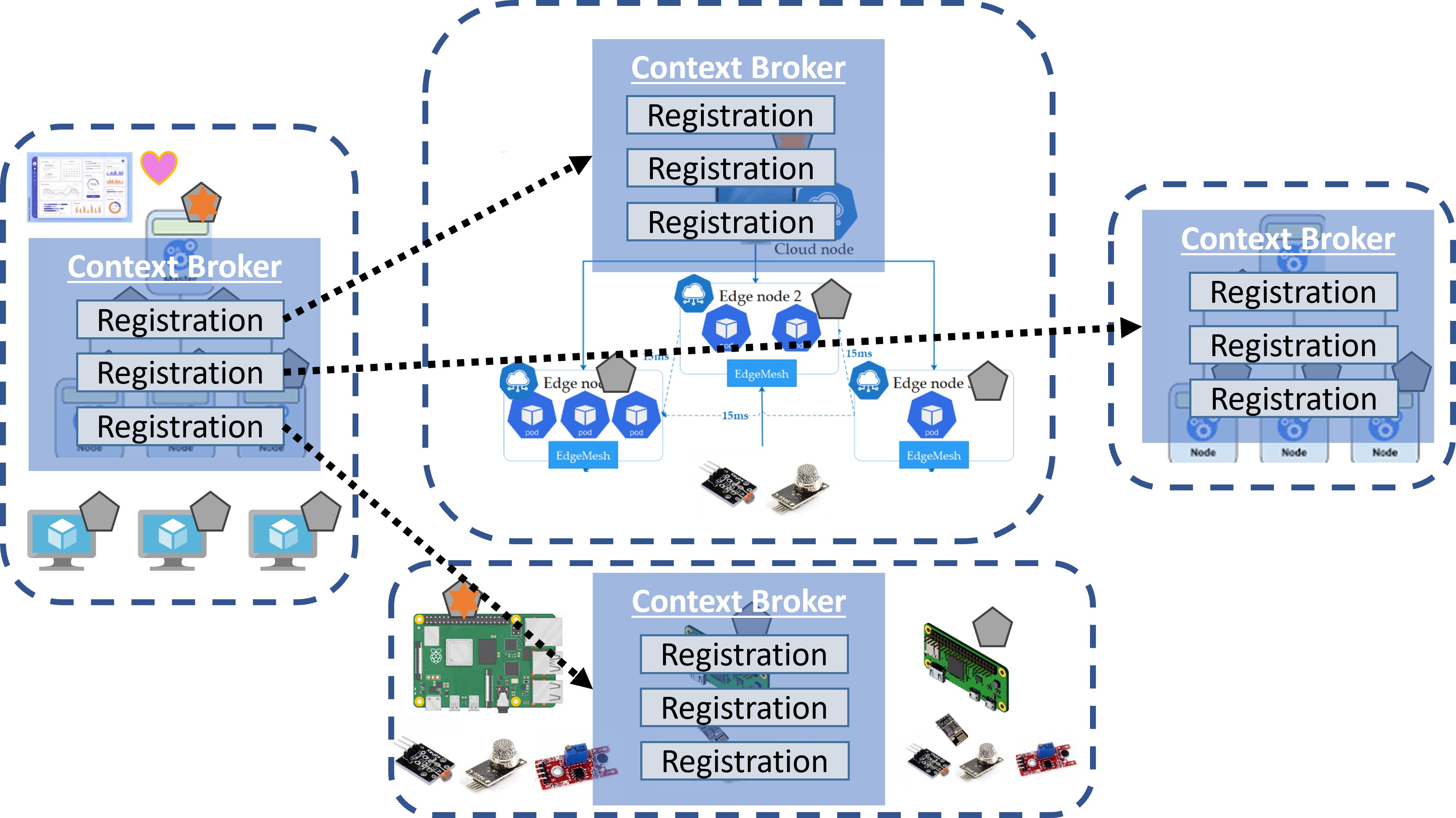
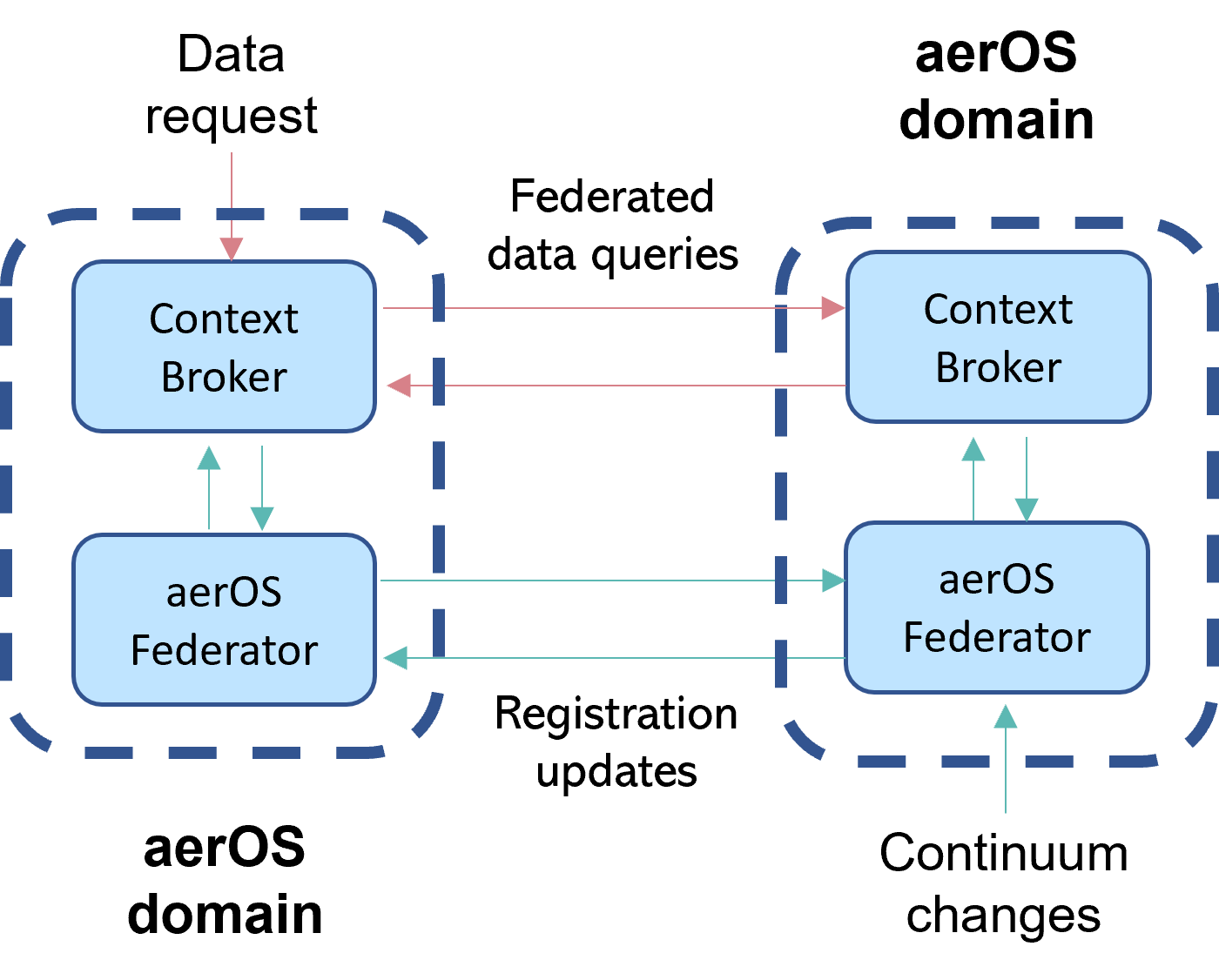
The core federation functionalities are provided by the context broker through the establishment of Context Source Registrations (CSR), which allows an Orion-LD instance to retrieve infor-mation (in NGSI-LD entities format) from another Orion-LD instances, which in the aerOS continuum means that data from one domain can be obtained just by calling the context broker of another domain once a proper registration has been performed. This capability is directly linked with the aerOS Data Fabric, but the aerOS Federator component has been designed to act as the starting point of this mechanism (domain discovery) and is only focused on the data related with the management of the continuum, which follows the aerOS continuum ontology. Finally, it also acts as the building block for the aerOS distributed domain repository.
{
  "id": "urn:ngsi-ld:SampleCSRegistration",
  "type": "ContextSourceRegistration",
  "information": [
    {
      "entities": [
        {
          "type": "Domain"
        },
        {
          "type": "LowLevelOrchestrator"
        },
        {
          "type": "InfrastructureElement"
        }
      ]
    }
  ],
  "contextSourceInfo": [
    {
      "key": "Authorization",
      "value": "urn:ngsi-ld:request"
    }
  ],
  "mode": "inclusive",
  "operations": [ "retrieveOps"],
  "endpoint": "https://upv-domain.aeros-project.eu/orion-ld",
  "hostAlias": "UPVDomain",
  "management": {
    "localOnly": true
  },
  "aerosDomain": "UPV",
  "aerosDomainFederation": true
}
Enhancement of Orion-LD for aerOS domain federation
Queries for retrieving contextual data as NGSI-LD entities actually stored in different context brokers play a main role in the aerOS federation. Thus, in the domain of distributed systems, particularly within the context of entity federation, the pagination of entity query results stands as a significant technical challenge. This challenge escalates when the queries involve dynamic attribute values, at which point the task transitions from merely difficult to seemingly unfeasible. For effective pagination, it is imperative to establish a consistent set of resulting NGSI-LD entities across different paginated queries. Otherwise, without this consistency, the realization of pagination is not viable.
These challenges have been extensively deliberated within the ETSI ISG CIM, in the course of standardizing the NGSI-LD API. Consequently, two distinct solutions have been formulated:
Entity Maps: this solution involves freezing the set of resulting entities as a list that only includes their IDs.
Snapshots: this approach goes a step further by freezing the entities themselves, storing them within a local database.
After some technical discussions, the Entity Maps strategy has been adopted for the aerOS project in order to reduce the amount of exchanged data among the brokers, aligning with its implementation in Orion-LD for the MVP of the project.
Going into more technical details, the process begins with an initial query to Orion-LD API to obtain a set of NGSI-LD entities (GET /ngsi-ld/v1/entities?<queryParameters>) during which the Entity Map is generated and stored in the broker. The response includes the Entity Map’s ID in an HTTP header (NGSILD-EntityMap), along with the first batch of entities in the payload body. Subsequent paginated requests must provide this Entity Map ID, along with offset/limit URL parameters for pagination.
An Entity Map is structured as an array mapping entity IDs to arrays of Context Source Registration IDs, indicating the registrations associated with each entity. In the aerOS project, where attributes of entities are not distributed across multiple brokers, the registration ID arrays typically contain a single entry. Furthermore, for entities hosted locally in the broker, a special identifier (@none) is used. Finally, armed with the information of the Entity Map, the broker is fully informed to dispatch distributed requests and compile the responses into an array of entities. Upon processing all responses, the broker then furnishes this array to the original requester.
{
  "urn:ngsi-ld:entities:E1": [ "urn:ngsi-ld:registrations:R1" ],
  "urn:ngsi-ld:entities:E2": [ "urn:ngsi-ld:registrations:R6" ],
  "urn:ngsi-ld:entities:E3": [ "urn:ngsi-ld:registrations:R0" ],
  "urn:ngsi-ld:entities:E4": [ "@none" ],
  "urn:ngsi-ld:entities:En": [ "urn:ngsi-ld:registrations:Rn" ]
}
Place in architecture
aerOS Federator block architecture in a single domain

aerOS Federator block architecture in multiple domains
User guide
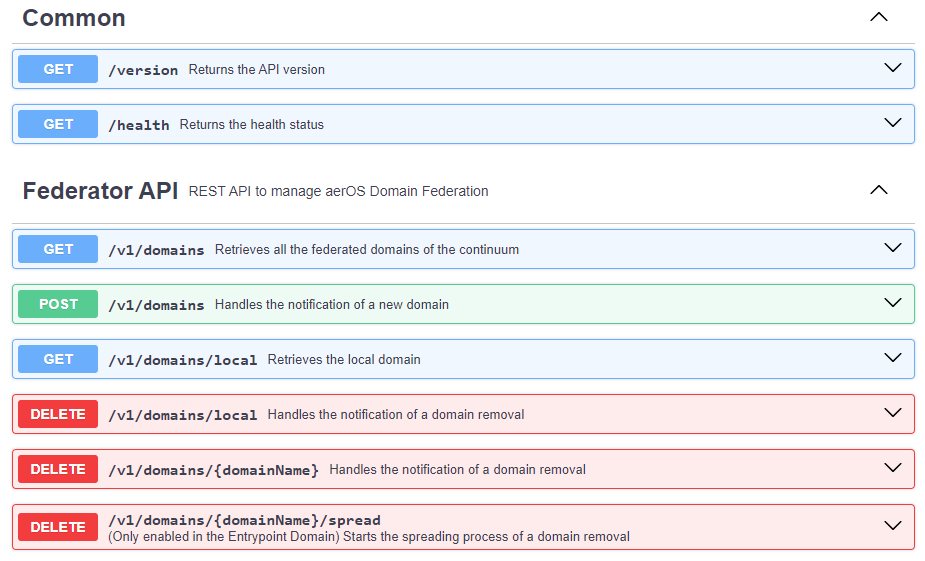
When the Federator starts, it performs an initialization process to discover if it has been deployed in a new aerOS Domain that must be spread through the continuum. If it’s a new Domain, it sends a POST request to its peer federator to start the spreading process to federate this new domain.
API Endpoints
Prerequisities
Orion-LD Context Broker deployed in each aerOS domain.
Depending on the mode of the CB authorization token retrieval (CB_TOKEN_MODE), the aeros-k8s-shim must be deployed in the same domain or Keycloak must be installed in the entrypoint domain.
Installation
Kubernetes
It is recommended to create a YAML file with the custom values. For example:
federator:
    envVars:
        isEntrypoint: true
        domain:
            name: Domain01
            description: This is a new domain
            publicUrl: https://upv-domain.aeros-project.eu
            owner: UPV
            cbUrl: http://orion-ld-broker.default.svc.cluster.local:1026
Then, install the Helm chart using the custom values from the previously created YAML file:
helm install federator aeros-common/federator -f custom-values.yaml
Docker
In Docker machines, get the docker-compose.yaml file and then edit it to set the proper values for the environment variables such as in the Helm chart:
wget --header "PRIVATE-TOKEN: <token>" https://gitlab.aeros-project.eu/api/v4/projects/65/packages/generic/federator/0.0.5/docker-compose.yaml
Configuration options
Note
It is recommended to use the Federator of the entrypoint domain as the peer federator
The aerOS Federator must be configured through the use of a set of environment variables:
APP_ENV: environment mode of the application (development or production).
APP_PORT: TCP port on which is exposed the application.
IS_ENTRYPOINT: boolean value to set if the Federator is deployed in the entrypoint domain.
DOMAIN_NAME: name of the domain in which is deployed the Federator.
DOMAIN_DESCRIPTION: description of the domain in which is deployed the Federator.
DOMAIN_PUBLIC_URL: public URL of the domain in which is deployed the Federator.
DOMAIN_OWNER: of the domain in which is deployed the Federator.
DOMAIN_CB_URL: URL pointing to the Orion-LD (Context Broker) instance of the domain. This URL must directly point to Orion-LD without passing through KrakenD or other API gateways. For instance: http://192.168.1.202:1036 or http://orion-ld-broker.default.svc.cluster.local:1026
DOMAIN_CB_HEALTH_URL: (only needed if the value of CB_HEALTH_CHECK_MODE is socket) URL pointing to the TCP healthcheck Orion-LD instance of the domain. This URL must directly point to Orion-LD without passing through KrakenD or other API gateways. For instance: http://192.168.1.202:1036 or http://orion-ld-broker.default.svc.cluster.local:1026.
DOMAIN_FEDERATOR_URL: (not compulsory) only needed if the Federator won’t be exposed through the domain’s Krakend (https://domain-public-url/federator). This will be used by other Federators to reach this Federator.
PEER_FEDERATOR_URL: URL pointing to your peer aerOS Federator, which must be selected in advance. For instance, https://cf-domain.aeros-project.eu/federator.
CB_HEALTH_CHECK_MODE: mode of the health checks (endpoint or socket). Endpoint means that a HTTP request is sent to the /version endpoint of Orion, while socket means that a TCP connection is opened.
TLS_CERTIFICATE_VALIDATION: boolean value to skip certificate validation in requests to HTTPS endpoints.
CB_TOKEN_MODE: mode of the CB authorization token retrieval. In order to retrieve this token, it can be used the aeros-k8s-shim (shim) or keycloak (keycloak).
AEROS_SHIM_URL: (only needed if CB_TOKEN_MODE=shim) URL of the aeros-k8s-shim API.
CB_OAUTH_CLIENT_ID: (only needed if CB_TOKEN_MODE=keycloak) CLIENT ID of the ContextBroker OAuth client in Keycloak.
CB_OAUTH_CLIENT_SECRET: (only needed if CB_TOKEN_MODE=keycloak) CLIENT SECRET of the ContextBroker OAuth client in Keycloak.
KEYCLOAK_URL: URL of the continuum Keycloak.
KEYCLOAK_REALM: realm of the continuum Keycloak.
Developer guide
The value of the APP_ENV env var must be set to development, which is the default value. Then, in order to load environment variables from a valid .env file for development purposes, configure the proper values of folder and file name (without the .env extension) using the constant variables defined in lines 63 and 64 of config/config.go file. The code uses by default the .env file to retrieve the environment variables. Furthermore, some examples are included inside the test folder.
The requirements for setting a proper environment for running the application are:
An already running Orion-LD instance directly reachable by the federator (configured through the DOMAIN_CB_URL env var).
At least, another aerOS Federator running (along with its own Orion-LD instance). One federator must be configured as the entrypoint one (IS_ENTRYPOINT env var).
If the testing Orion-LD instances aren’t behind a KrakenD, don’t include the /orionld path in the CSRs if you want to achieve a valid federation. To do it, check lines 68, 115 and 149 of models/contextSourceRegistration.go.
Finally, run this command to start the application:
go run main.go
License
An open-source license will be selected.