Load Balancer MetalLB
Introduction
aerOS networking integrates MetalLB as a load-balancer which primarely, and beyond its scope to ensure reliable and scalable network traffic management, advertises an external routable IP for accessing aerOS domain.
MetalLB is a load-balancer implementation for Kubernetes clusters running on bare metal, where traditional cloud-based load balancers are not available. It enables access to underlying K8s services via an external IP address, just like in a cloud environment a load balancer would. The integration of MetalLB into aerOS domain,enables external access to deployed services without requiring any additional hardware or complex configurations.
For the advertisement of an external IP MetalLB operates in two main modes:
Layer 2 (L2) Mode: In this mode, MetalLB uses standard Ethernet networking to make services accessible by announcing their IP addresses directly to the network. This mode is simple to set up and works well in smaller or less complex network environments.
Border Gateway Protocol (BGP) Mode: In this mode, MetalLB uses BGP to advertise IP addresses to routers in your network. This mode is more complex but provides greater scalability and control, making it suitable for larger or more complex network environments.
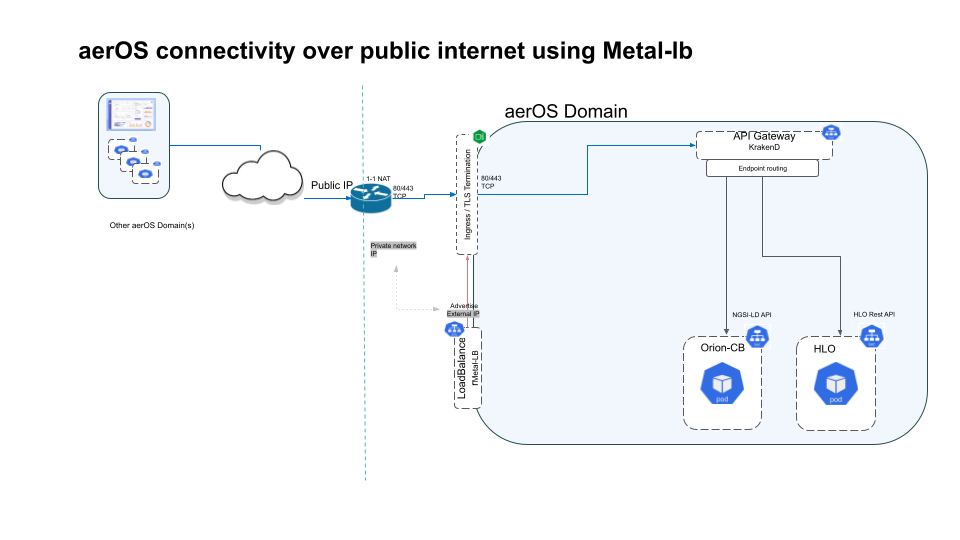
For the aerOS setup, we will configure MetalLB in L2 mode to assign an external (private network) IP to the aerOS services. MetalLB is configured to advertise and assign this private network IP to the aerOS domain, ensuring that services are accessible.
At this point aerOS services are accessible from within the private network (LAN) where the domain is deployed. For providing access to clients (and other aerOS domains) out of the local network a 1-1 NAT should be used by configuring the premise’s edge router to forward requests received in a public IP (and addressing aerOS ports) to the private network IP advertised by MetalLB to the aerOS domain access point (see Ingress).
Features
Scalability: Easily scales with network’s growth.
Flexibility: Supports both L2 and BGP modes.
Ease of Use: Simple setup with Helm and Kubernetes YAML configurations.
Cost-Effective: Utilizes existing hardware without the need for additional equipment.
Place in Architecture
MetalLB is an integral part of the aerOS architecture. As mentioned before its main concern is to advertise an external and routable IP for aerOS domain entrypoint (Ingress), providing thus access to aerOS APIs. Additionally it ensures that network traffic is efficiently distributed and services are reliably accessible.
User Guide
Prerequisites
Make sure you have the following ready before you proceed with the installation:
Kubernetes Cluster: Ensure your Kubernetes cluster is up and running.
Helm: Installed on your system. Make sure it is version 3 or newer.
IPv4 Addresses: A pool of IPv4 LAN addresses (in fact one is enough) that MetalLB will assign for aerOS domain access. This IP shoud be routable within the LAN.
Installation
Add MetalLB Repository
First, add the MetalLB Helm repository to your Helm client:
helm repo add metallb https://metallb.github.io/metallb
Install MetalLB
Next, install MetalLB using the following Helm command:
helm install metallb metallb/metallb
Configuration Options
The configuration needed after deployment is to inform MetalLB which IPs to assign for LoadBalancer type k8s services and how to advertise the selected IP. aerOS selected method is L2Advertisement mode.
After the installation, we create a configuration file to specify the IP address pool and L2Advertisement.
Create Configuration File
Create a YAML file with the following content to configure the IP address pool and L2Advertisement:
apiVersion: metallb.io/v1beta1
kind: IPAddressPool
metadata:
  name: first-pool
  namespace: default
spec:
  addresses:
  - 10.220.2.214-10.220.2.214  # Change the IP range as per your requirement

---
apiVersion: metallb.io/v1beta1
kind: L2Advertisement
metadata:
  name: default
  namespace: default
spec:
  ipAddressPools:
  - first-pool
Apply the Configuration
Apply the configuration file using kubectl:
kubectl apply -f <your-configuration-file>.yaml
Replace <your-configuration-file> with the name of your YAML configuration file.
Developer Guide
License
Notice (Dependencies)
Metal-lb relies on several dependencies, including:
Kubernetes: Container orchestration platform.
Helm: Package manager for Kubernetes.
For more information about Metal-lb, visit https://metallb.universe.tf/