Wireguard VPN
Introduction
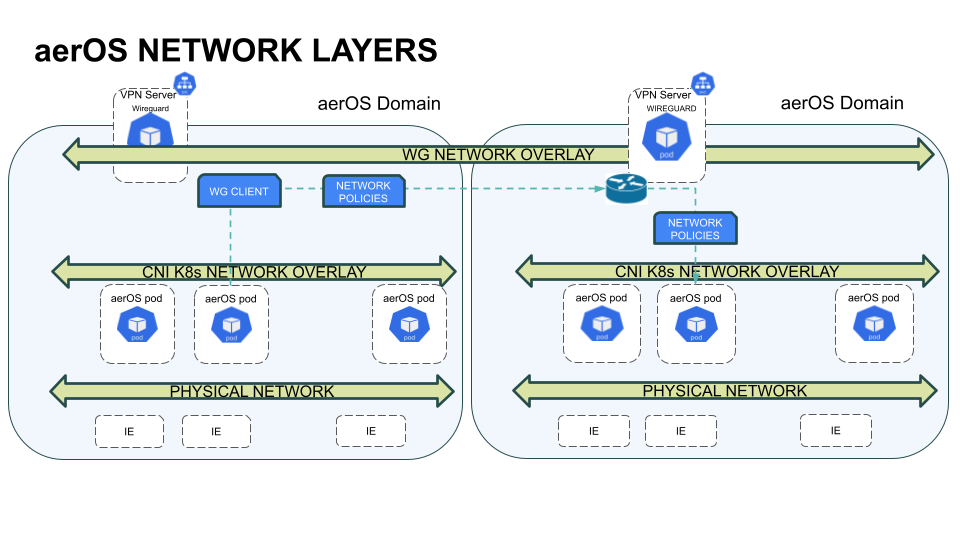
In the aerOS architecture, the Wireguard VPN plays a crucial role in enabling secure communication between aerOS services across different aerOS domains. aerOS services, which are deployed as Kubernetes services or pods, often need to communicate with services in other aerOS domains. Wireguard facilitates this inter-domain communication by creating an overlay network (tunnel) that ensures security and connectivity.
For example, consider a scenario where one service in aerOS Domain A needs to communicate with another service in aerOS Domain B. Using Wireguard, a secure overlay network is established, allowing these services to “speak” with each other seamlessly. This setup ensures that both services can securely reach each other, maintaining the integrity and confidentiality of the transmitted data.
Features
Simplicity: Minimal configuration required compared to traditional VPNs.
Speed: High performance with low overhead.
Security: Utilizes modern cryptographic techniques.
Portability: Runs on various platforms and devices.
Scalability: Suitable for both small-scale and large-scale deployments.
Place in architecture
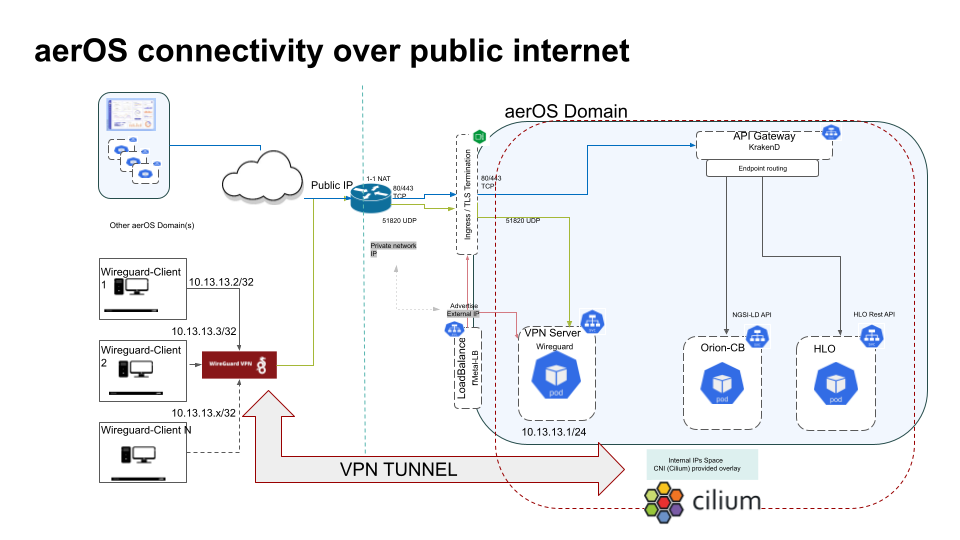
In a Kubernetes cluster, Wireguard can be deployed as a server pod. Containers (services) from other clusters can connect to the Wireguard server, enabling an overlay network across multiple clusters. This setup ensures secure communication between services in different clusters.
User guide
Prerequisites
A Kubernetes cluster up and running.
kubectlconfigured to interact with your Kubernetes cluster.Basic understanding of Kubernetes and networking concepts.
Generate private and public keys for the WireGuard server and for N clients.
Note
To generate the corresponding keys, use apt install wireguard-tools and then:
wg genkey | tee privatekey | wg pubkey > publickey
Installation
1.Server-side (aerOS Domain 1)
To install wireguard-server in an aerOS Domain (K8s cluster), follow these steps:
Create a ConfigMap for Wireguard configuration:
kind: ConfigMap
apiVersion: v1
metadata:
  name: wg-configmap
data:
  wg0.conf: |
    [Interface]
    Address = 10.13.13.1/24
    ListenPort = 51820
    PrivateKey = (Server's private key)
    PreUp = iptables -I FORWARD -i wg0 -j REJECT
    PostDown = iptables -D FORWARD -i wg0 -j REJECT
    PreUp = iptables -I FORWARD -i wg0 -d 10.13.13.0/24 -j ACCEPT
    PostDown = iptables -D FORWARD -i wg0 -d 10.13.13.0/24 -j ACCEPT

    [Peer]
    #client-1
    PublicKey = (Client's public key)
    AllowedIPs = 10.13.13.2/32


# Apply the ConfigMap
kubectl apply -f wg-configmap.yaml
Create a Deployment for the Wireguard server:
apiVersion: apps/v1
kind: Deployment
metadata:
  name: wireguard-server
spec:
  replicas: 1
  selector:
    matchLabels:
      app: wireguard
  template:
    metadata:
      labels:
        app: wireguard
    spec:
      containers:
        - name: wireguard
          image: masipcat/wireguard-go:latest
          command:
          - sh
          - -c
          - /entrypoint.sh
          ports:
          - containerPort: 51820
            protocol: UDP
            name: wireguard
          env:
          - name: LOG_LEVEL
            value: info
          securityContext:
            capabilities:
              add:
                - NET_ADMIN
                - SYS_MODULE
            privileged: true
          resources:
            requests:
              memory: 64Mi
              cpu: "100m"
            limits:
              memory: 256Mi
          volumeMounts:
          - name: cfgmap
            mountPath: /etc/wireguard/wg0.conf
            subPath: wg0.conf
          - name: host-volumes
            mountPath: /lib/modules
      volumes:
      - name: cfgmap
        configMap:
          name: wg-configmap
      - name: host-volumes
        hostPath:
          path: /lib/modules
          type: Directory

# Apply the Deployment
kubectl apply -f wireguard-deployment.yaml
Create a Service for the Wireguard server:
kind: Service
apiVersion: v1
metadata:
  annotations:
    metallb.universe.tf/allow-shared-ip: "sharing-same-ip"
  name: wireguard
  labels:
    app: wireguard
spec:
  type: LoadBalancer
  ports:
  - name: wg
    protocol: UDP
    port: 51820
    targetPort: 51820
  selector:
    app: wireguard

# Apply the Service
kubectl apply -f wg-service.yaml
2.Client-side (aerOS Domain 2)
Create a ConfigMap for Wireguard client configuration:
apiVersion: v1
kind: ConfigMap
metadata:
  name: wireguard-config
data:
  wg0.conf: |
     [Interface]
     Address = 10.13.13.2/32
     PrivateKey = (Client's private key)
     ListenPort = 51820

     [Peer]
     PublicKey = (Server's public key)
     Endpoint =  ncsrd-dev-domain.aeros-project.eu:51820
     AllowedIPs = 10.13.13.0/24
     persistentKeepalive = 25

# Apply the ConfigMap
kubectl apply -f wireguard-config.yaml
Create a Deployment for the Wireguard client:
apiVersion: apps/v1
kind: Deployment
metadata:
  name: wireguard-client
  labels:
    app: wireguard-client
spec:
  replicas: 1
  selector:
    matchLabels:
      app: wireguard-client
  template:
    metadata:
      labels:
        app: wireguard-client
    spec:
      initContainers:
      - name: setup-config
        image: busybox
        command: ["sh", "-c", "cp /config-src/* /config-dest/"]
        volumeMounts:
        - name: wg-config
          mountPath: /config-src
          readOnly: true
        - name: wg-temp
          mountPath: /config-dest
      containers:
      - name: wireguard
        image: ghcr.io/linuxserver/wireguard
        securityContext:
          capabilities:
            add: ["NET_ADMIN"]
          privileged: true
        env:
        - name: WG_DISABLE_IPV6
          value: "yes"
        volumeMounts:
        - name: wg-temp
          mountPath: /config/wg_confs
          readOnly: false
      - name: nginx # example app
        image: nginx:latest
        ports:
        - containerPort: 80
      volumes:
      - name: wg-config
        configMap:
          name: wireguard-config
          defaultMode: 0600
      - name: wg-temp
        emptyDir: {}

# Apply the Deployment
kubectl apply -f wireguard-client.yaml
3.Verify Installation/Connection
Once the Wireguard server (Domain 1) and Wireguard client (Domain 2) are correctly installed in both domains, we can verify their overlay network connection.
Method 1:
Check the Wireguard status on the server:
kubectl exec -it wireguard-server-5d845cb9d-bgrhc -- wg
Output:
Defaulted container "wireguard" out of: wireguard
interface: wg0
  public key: w6r8RJaMOkGxdhXkR29jE/MNh5ivgZtfbgXWX/Y4xj0=
  private key: (hidden)
  listening port: 51820

peer: eXf93YG023jt+Srjls43lR81VQ/rXBz+eWv+ewUBHlI=
  endpoint: 10.247.3.156:32796
  allowed ips: 10.13.13.2/32
  latest handshake: 2 minutes, 8 seconds ago  # Handshake created between server and client
  transfer: 642.73 KiB received, 185.65 KiB sent
Method 2:
The Wireguard interface is set to 10.13.13.1/24 and the client (peer) has an IP 10.13.13.2/32. Let’s ping each other to confirm the connection is established.
From Domain 1 (server):
kubectl exec -it wireguard-server-5d845cb9d-bgrhc -- ping -c 4 10.13.13.2
Output:
Defaulted container "wireguard" out of: wireguard
PING 10.13.13.2 (10.13.13.2): 56 data bytes
64 bytes from 10.13.13.2: seq=0 ttl=64 time=0.849 ms
64 bytes from 10.13.13.2: seq=1 ttl=64 time=0.762 ms
64 bytes from 10.13.13.2: seq=2 ttl=64 time=0.741 ms
64 bytes from 10.13.13.2: seq=3 ttl=64 time=0.783 ms

--- 10.13.13.2 ping statistics ---
4 packets transmitted, 4 packets received, 0% packet loss
round-trip min/avg/max = 0.741/0.783/0.849 ms
From Domain 2 (client):
kubectl exec -it wireguard-client-1-c999ffbf7-4mngp -- ping -c 4 10.13.13.1
Output:
Defaulted container "wireguard" out of: wireguard, nginx, setup-config (init)
PING 10.13.13.1 (10.13.13.1) 56(84) bytes of data.
64 bytes from 10.13.13.1: icmp_seq=1 ttl=64 time=0.943 ms
64 bytes from 10.13.13.1: icmp_seq=2 ttl=64 time=0.770 ms
64 bytes from 10.13.13.1: icmp_seq=3 ttl=64 time=0.810 ms
64 bytes from 10.13.13.1: icmp_seq=4 ttl=64 time=0.737 ms

--- 10.13.13.1 ping statistics ---
4 packets transmitted, 4 received, 0% packet loss, time 3046ms
rtt min/avg/max/mdev = 0.737/0.815/0.943/0.078 ms
Method 3:
Let’s trace the network route between the server and the client.
From the server-side:
kubectl exec -it wireguard-server-5d845cb9d-bgrhc -- traceroute 10.13.13.2
Output:
Defaulted container "wireguard" out of: wireguard
traceroute to 10.13.13.2 (10.13.13.2), 30 hops max, 46 byte packets
 1  10.13.13.2 (10.13.13.2)  0.870 ms  1.638 ms  0.596 ms
From the client-side:
kubectl exec -it wireguard-client-1-c999ffbf7-4mngp -- traceroute 10.13.13.1
Output:
Defaulted container "wireguard" out of: wireguard, nginx, setup-config (init)
traceroute to 10.13.13.1 (10.13.13.1), 30 hops max, 46 byte packets
 1  10.13.13.1 (10.13.13.1)  0.877 ms  0.761 ms  0.886 ms
We can see that with one hop they reach each other even while being in separate networks. With the help of Wireguard, the network traffic is securely tunneled directly from one aerOS service to another, effectively creating a seamless and efficient connection between the two services as if they were part of the same local network.
Configuration options
Server-side
Wireguard Configuration File (wg0.conf)
The Wireguard configuration file (wg0.conf) is where you define the interface and peer settings. Here are some key options you can configure:
- [Interface] Section:
Address: The IP address for the Wireguard interface. - Example:
10.13.13.1/24ListenPort: The port on which Wireguard will listen for incoming connections. - Example:
51820PrivateKey: The private key for the Wireguard server. This key should be kept secret. - Example:
iELN6zGpzemkkJyo2jBSDlBuIE/J8PW67Poi66xpFHs=PreUp and PostDown: Commands to be executed before the interface is brought up and after it is brought down. These are typically used for configuring iptables rules. - Examples:
PreUp = iptables -I FORWARD -i wg0 -j REJECTPostDown = iptables -D FORWARD -i wg0 -j REJECTPreUp = iptables -I FORWARD -i wg0 -d 10.13.13.0/24 -j ACCEPTPostDown = iptables -D FORWARD -i wg0 -d 10.13.13.0/24 -j ACCEPT
Note
You can adjust the IP tables based on your routing needs.
- [Peer] Section:
PublicKey: The public key of a Wireguard peer (client). - Example:
eXf93YG023jt+Srjls43lR81VQ/rXBz+eWv+ewUBHlI=AllowedIPs: The IP addresses that are allowed to communicate with this peer. - Example:
10.13.13.2/32
Environment Variables in the Deployment
The Wireguard server deployment includes the following environment variables:
LOG_LEVEL: Sets the logging level for the Wireguard server. Example: info.
Security Context
The security context in the deployment specifies the following:
capabilities: Adds the NET_ADMIN and SYS_MODULE capabilities, which are necessary for Wireguard to function.
privileged: The container runs in privileged mode to allow access to necessary system resources.
Resource Requests and Limits
The deployment specifies resource requests and limits to ensure the Wireguard server has the necessary resources:
requests: The minimum resources required. Example: memory: 64Mi, cpu: “100m”.
limits: The maximum resources allowed. Example: memory: 256Mi.
Volume Mounts
The deployment mounts the following volumes:
cfgmap: Mounts the Wireguard configuration file from the ConfigMap.
host-volumes: Mounts the /lib/modules directory from the host to the container, necessary for loading kernel modules.
Service Configuration
The service configuration includes the following options:
type: The type of service. Example: LoadBalancer.
ports: The ports exposed by the service. Example: port: 51820, protocol: UDP.
selector: Labels used to identify the pods that the service targets. Example: app: wireguard.
These options provide flexibility in configuring and deploying the Wireguard server in your Kubernetes cluster.
Client-side
Wireguard Client Configuration File
The Wireguard client configuration file is where you define the interface and peer settings. Here are some key options you can configure:
- [Interface] Section:
Address: The IP address for the Wireguard client interface. - Example:
10.13.13.3/32PrivateKey: The private key for the Wireguard client. This key should be kept secret. - Example:
AFXh/ZrI001vUt6Bb+g3TcgkaqUCDrSxTN9JskbM4Hg=ListenPort: The port on which Wireguard will listen for incoming connections. - Example:
51820
- [Peer] Section:
PublicKey: The public key of the Wireguard server. - Example:
w6r8RJaMOkGxdhXkR29jE/MNh5ivgZtfbgXWX/Y4xj0=Endpoint: The endpoint address and port of the Wireguard server. - Example:
ncsrd-dev-domain.aeros-project.eu:51820AllowedIPs: The IP addresses that are allowed to communicate with this peer. - Example:
10.13.13.0/24PersistentKeepalive: The interval at which keepalive packets are sent to maintain the connection. - Example:
25
Environment Variables in the Deployment
The Wireguard client deployment includes the following environment variables:
WG_DISABLE_IPV6: Disables IPv6 for the Wireguard client. Example: yes.
Security Context
The security context in the deployment specifies the following:
capabilities: Adds the NET_ADMIN capability, which is necessary for Wireguard to function.
privileged: The container runs in privileged mode to allow access to necessary system resources.
Volume Mounts
The deployment mounts the following volumes:
wg-config: Mounts the Wireguard configuration file from the ConfigMap.
wg-temp: An empty directory used to hold the temporary configuration files during initialization.
Note
The Wireguard client is deployed alongside an example application (Nginx) as a sidecar container. The Nginx server is exposed on port 80, but this can be replaced with any other application as needed.