Self-awareness
Introduction
The aerOS self-awareness module is one of the 4 essential modules within the aerOS self-* capabilities set. This component analyses and obtains information from the node (CPU cores, total RAM, CPU and memory currently used, if the system has real-time characteristic, current power consumption and average power consumption – others will be added during the action), continuously monitoring its health status and workload. Due to the need to offer real-time information on the status of the IE, this module is subdivided into two components, which are executed continuously. One (power_consumption) is in charge of obtaining the consumption (which requires more computing time) using PowerTOP, an open-source software designed to measure the energy consumption of a node. The other (hardware_info) is responsible for obtaining the rest of the parameters instantly, using (among others) a Python module called psutil. The component that obtains the consumption needs an average of 20 seconds per execution to obtain new valid values and the other only needs 1 second to update its information. The purpose is to provide updated information to the rest of the self-* capabilities as fast as possible to modify the operation of the IE, if necessary.
Features
Currently, the module is able to obtain the following information from each IE in the aerOS computing continuum:
domain: indicates the aerOS Domain where the IE is located.
hostname: internal name.
internalIpAddress: internal IP address.
macAddress: MAC address.
cpuCores: number of processor cores.
currentCpuUsage: current percentage of CPU usage.
ramCapacity: maximum RAM memory capacity (in Megabytes).
availableRam: currently available RAM memory (in Megabytes).
currentRamUsage: RAM memory currently in use (in Megabytes).
currentRamUsagePct: percentage of RAM memory currently in use.
diskCapacity: maximum capacity of the storage medium (in Megabytes).
availableDisk: current available capacity of the storage medium (in Megabytes).
currentDiskUsage: current used capacity of the storage medium (in Megabytes).
currentDiskUsagePct: percentage of current capacity utilisation of the storage medium.
avgPowerConsumption: average electrical energy consumption (in Watts).
currentPowerConsumption: current electrical energy consumption (in Watts).
realTimeCapable: indicates whether the IE is capable of executing tasks that require the real-time constraint.
cpuArchitecture: indicates processor architecture (AMD64, ARM64, etc.).
operatingSystem: indicates the operating system installed (e.g. GNU/Linux).
infrastructureElementTier: indicates the tier of the IE.
Place in architecture
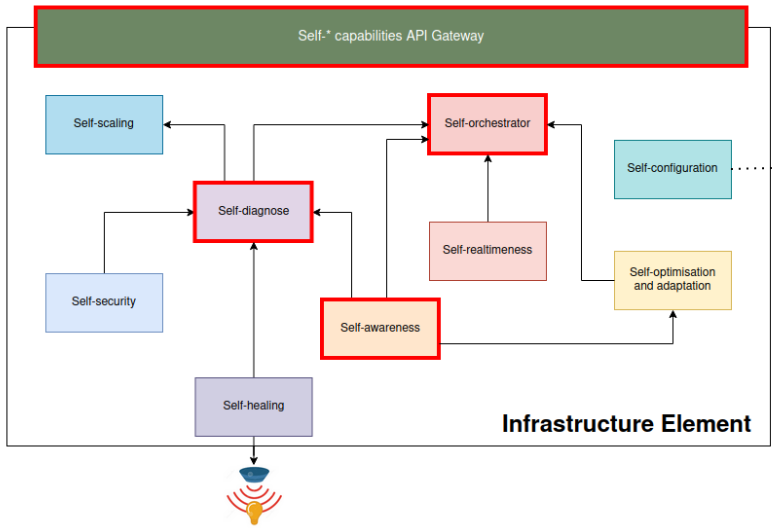
The following figure describe the self-awareness module inside the IE and the relationships with another self-* modules.
User guide
Prerequisities
To start using the self-awareness module, please visit the Common deployments repository for more information.
Warning
Remember to create the necessary NGSI-LD entities related to Domains, LLOs, IEs, etc. in the context broker of the Domain.
The Docker images are split according to architecture (AMD64 and ARM64). Therefore, when launching them in Kubernetes or Docker, the deployment files must be modified to select the architecture.
Installation
Configuration options
Environment variables
AEROS_VERBOSE: indicates whether or not the module provides information through the Docker container log.
AEROS_AUTHORIZATION: indicates whether KrakenD shall be used to communicate with the context broker.
AEROS_KRAKEND_URL: the URL where KrakenD is running (IP and port).
AEROS_KRAKEND_CLIENT_ID: the ID of the client provided to the Auth server.
AEROS_KRAKEND_CLIENT_SECRET: the secret of the client provided to the Auth server.
AEROS_KRAKEND_USERNAME: the username provided to the Auth server.
AEROS_KRAKEND_PASSWORD: the password provided to the Auth server.
AEROS_ORION_URL: the URL where the context broker is running (IP and port).
AEROS_CONTAINER_TECHNOLOGY: the container technology of the execution environment (Kubernetes or Docker).
AEROS_LLO: the ID of the associated LLO.
AEROS_IE_LOCATION: the vector of coordinates (latitude and longitude) of the physical location of the IE.
AEROS_IE_IP: the IP of the IE where is running the self-awareness module.
Developer guide
Local deployment (hardware_info)
To test the code locally:
Download script.py file.
Run the following command to install the necessary dependencies:
pip3 install getmac psutil requests
In the same directory where the file was downloaded, run the following command to launch the self-awareness (hardware_info):
python3 script.py
Local deployment (power_consumption)
To test the code locally:
Download script.py file.
Run the following command to install the necessary dependencies:
pip3 install getmac pandas requests
apt-get install -y powertop
In the same directory where the file was downloaded, run the following command to launch the self-awareness (power_consumption):
python3 script.py