Self-scaling
Introduction
This component will be able to horizontally scale (up or down) the resources devoted to a specific component (inside a node) in a dynamic fashion, based on time series inference and custom logic.
Features
Self-scaling will store time series with component usage metrics for each active component in the domain. Deep learning techniques based on time series models and the use of frugality will be used to predict the usage metrics and horizontally scale the resources dedicated to each component of each infrastructure element. The software will be autonomous and will act according to the dynamic behaviour of each domain.
Place in architecture
When the administrator user enables the self-scaling controller it automatically starts working. It accesses the metrics and stores them in its internal database, performs the deep learning process and infers to create the horizontal objects pod autoscalers dynamically. All this with pre-set values in the initial configuration.
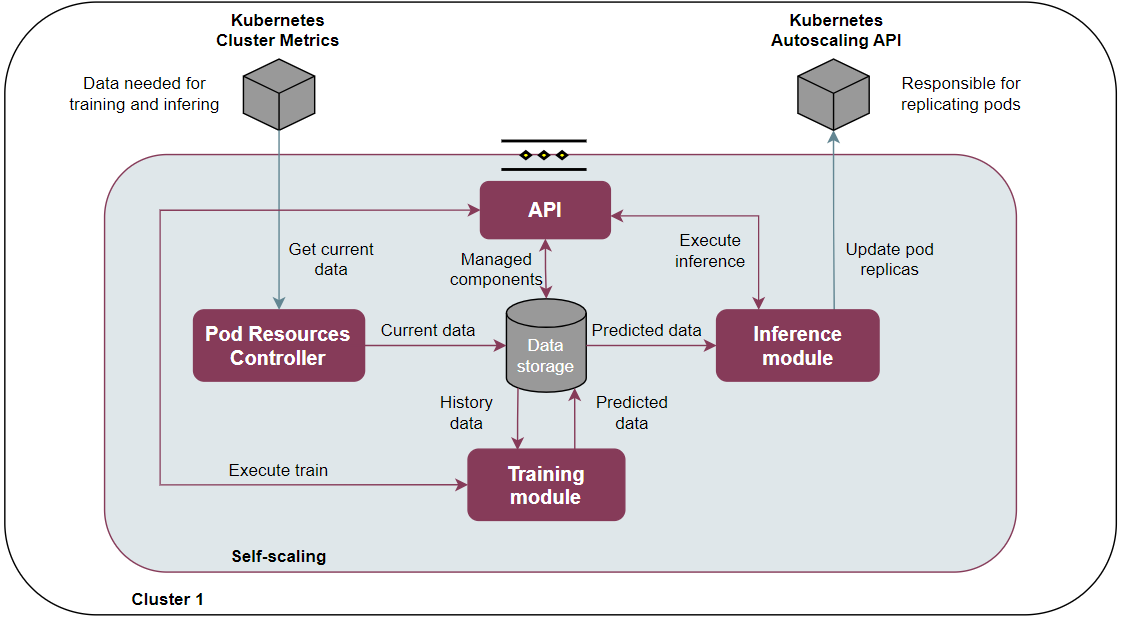
API REST: Contains the logic necessary to make GET and POST calls to intervene with the system behaviour, change default values or collect information.
Pod Resources Controller: Performs the collection of metrics and is responsible for storing the values in 15-minute intervals.
Database storage: Contains the history and predicted data of all components. Also, contains the relative information about if each component are activated to infer or not.
Training module: Collects the raw data from the history databases and converts it to the format needed for the deep learning process. Executes the data predictions and stores them in a new database.
Inference module: Adds logic to the data in the future database and generates the inference process. Creates or replaces the horizontal pod autoscaler objects. Changes the previous values to the new ones based on the results obtained.
User guide
This component has a management API that provides a flask-based REST interface that can be interacted with to configure certain values. The url must include not only the address of the component, but also the action to be performed and the message body if necessary. The response shall include the requested information or the result of the execution of a command.
Method |
Endpoint |
Description |
Payload (if need) |
Response format |
|---|---|---|---|---|
GET |
/v1/components |
Return components |
{“components”: [{“name”: “api”,”managed”: true}]}} |
|
POST |
/v1/components |
Update managed components |
{“components”: [“components”: [{“name”: “api”,”managed”: true}]}]} |
[“Components managed updates sucessfully”,”Content-Type not supported!”,”Invalid JSON”,”Managed components must be true or false”] |
GET |
/v1/train-values |
Return train values |
{“Future_data”: “1”, “History_data”: “5”} |
|
POST |
/v1/train-values |
Update train values |
{“Future_data”: “1”, “History_data”: “5”} |
[“Train values changed”,”Content-Type not supported!”,”Error in json body”,”Values must be positive numbers”] |
GET |
/v1/train |
Execute the train |
[“Train module executed successfully”,”Not components to train”,”Insufficient data”] |
|
GET |
/v1/inference |
Execute the inference |
[“Infence complete sucessfully”,”Error in execution Inference Module”] |
|
GET |
/version |
Return version |
{“component”: “self-scaling”,”version”: “1.0.0”} |
|
GET |
/v1/health |
Return health status |
{“status”: “healthy”} |
|
GET |
/v1/api-export |
Return OpenAPI JSON format |
{“openapi”: “3.0.0”,”info”: {…}} |
Prerequisities
Kubernetes cluster (e.g. microk8s, k8s).
Helm package manager for kubernetes.
Enable metrics server to get the metrics from cluster.
Installation
This component is provided as a Helm chart. Refer to specific deployment instructions.
Developer guide
This code is expected to be executed within a Helm chart, in a Kubernetes-governed platform. It has been also tested with Docker compose and directly over Ubuntu x64 distributions, with and without GPU NVIDIA processors. In case that developers aims at using the code directly over a given Operating System, non-virtualized, the code has been tested only in Ubuntu 20.04 machines, and hence we do not grant that it will work in any other OS.
This code is open source and can be freely used by the innovation and research community. In case that commits are to be made, the mantainer team (UPV) holds the rights to accept or deny them. Best practices are encouraged in the latter case.
License
This software is licensed under the Apache 2.0 license.
Notice (dependencies)
aerOS - Autonomous, scalablE, tRustworthy, intelligent European meta Operating System for the IoT edge-cloud continuum
Horizon Europe CL4-2021-DATA-01-05
Self-Scaling
Copyright 2022-2025 Universitat Politècnica de València
Included Software
Used Software
click 8.0.3 (https://github.com/pallets/click/tree/8.0.x), BSD-3-Clause li-cense
colorama 0.4.4 (https://github.com/tartley/colorama/tree/0.4.4), BSD-3-Clause license
Flask 2.0.2 (https://github.com/pallets/flask/tree/2.0.x), BSD-3-Clause li-cense
itsdangerous 2.0.1 (https://github.com/pallets/itsdangerous/tree/2.0.1) BSD-3-Clause license
Jinja2 3.0.3 (https://github.com/pallets/jinja/tree/3.0.3), BSD-3-Clause license
MarkupSafe 2.0.1 (https://github.com/pallets/markupsafe/tree/2.0.1), BSD-3-Clause license
Werkzeug 2.0.2 (https://github.com/pallets/werkzeug/tree/2.0.x), BSD-3-Clause license
gunicorn 20.1.0 (https://github.com/benoitc/gunicorn/tree/20.x), custom li-cense (see list below)
requests 2.27.1 (https://github.com/psf/requests/tree/v2.27.x), Apache-2.0 license
flask_wtf 1.0.0 (https://github.com/wtforms/flask-wtf/tree/1.0.x), BSD-3-Clause license
peewee 3.14.10 (https://github.com/coleifer/peewee/tree/3.14.10), MIT license
wtforms (https://github.com/wtforms/wtforms), BSD-3-Clause license
kubernetes (https://github.com/kubernetes-client/python), Apache-2.0 license
pint (https://github.com/hgrecco/pint/tree/master), BSD-3-Clause li-cense
pymsql (https://github.com/PyMySQL/PyMySQL), MIT license
pandas (https://github.com/pandas-dev/pandas), BSD-3-Clause license
neuralprophet (https://github.com/ourownstory/neural_prophet), MIT license
List of licenses
BSD-3-Clause license (https://opensource.org/license/bsd-3-clause/)
Gunicorn license (https://github.com/benoitc/gunicorn/blob/master/LICENSE)
Apache-2.0 license (https://www.apache.org/licenses/LICENSE-2.0)
MIT license (https://opensource.org/license/mit/)