Self-security
Introduction
Self security module will check network interfaces and will analyse traffic to check if there are attacks or vulnerabilities. Potentially a example for simple use case will block the traffic if some rules/conditions are met.
Features
This module focuses on deploying an Intrusion Detection System (IDS) based on suricata on a kubernetes cluster. It aims to monitor network traffic towards the nodes of the kubernetes cluster as described above.
Place in architecture
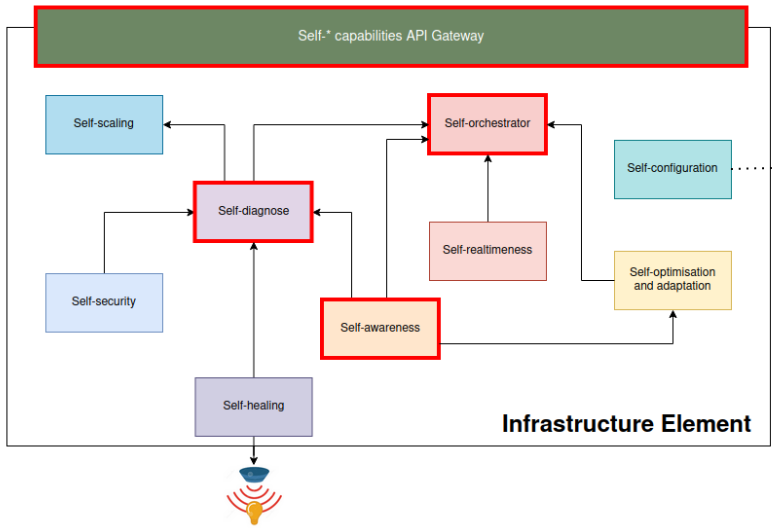
The following figure describe the self-security module inside the IE and the relationship with another self-* modules.
User guide
The primary objective is to monitor the network traffic directed towards the nodes of our Kubernetes cluster. The configuration files essential for this module are:
[suricata-suricata.yaml](suricata-suricata.yaml)
[suricata-rules.yaml](suricata-rules.yaml)
[suricata-daemonset.yaml](suricata-daemonset.yaml)
[suricata.yaml](suricata.yaml)
[suricata.rules](suricata.rules)
There are two primary configurations for deploying Suricata in a Kubernetes environment:
[Local setup (Minikube)](#local-setting-up-minikube)
[Cloud services setup (Digital Ocean)](#cloud-services-setting-up-digital-ocean)
After deploying Suricata, you can test its functionality by sending ICMP packets using the Ping command. The rules configured in suricata.rules or suricata-rules.yaml will determine Suricata’s response.
Use the following commands to test:
ping <NODE-IP>
To verify Suricata’s activity:
kubectl exec -it <POD_NAME> -- cat /var/log/suricata/fast.logkubectl exec -it <POD_NAME> -- cat /var/log/suricata/eve.json
Prerequisities
Installation
Clone the repository
Change the values we want in suricata.yaml/suricata-suricata.yaml and suricata.rules/suricata-rules.yaml
Deploy the suricata configuration and check firewall rules if we are using cloud services
Perform the test using ICMP traffic.
Check Suricata activity.
Local setting up (Minikube)
Setting up the configuration
We can modify the [suricata.yaml](suricata.yaml)/[suricata-suricata.yaml](suricata-suricata.yaml) and [suricata.rules](suricata.rules)/[suricata-rules.yaml](suricata-rules.yaml) configuration files as required depending on the Option we use to apply the configuration, as seen below.
Applying settings
There are two options to apply the configuration to the Kubernetes cluster:
[ ] Option 1:
kubectl create -f suricata-suricata.yaml
kubectl create -f suricata-rules.yaml
kubectl create -f suricata-daemonset.yaml
[ ] Option 2:
kubectl create configmap suricata-config --from-file=suricata.yaml=suricata.yaml
kubectl create configmap suricata-rules --from-file=suricata.rules
kubectl create -f suricata-daemonset.yaml
Cloud services setting up (Digital Ocean)
The setup process for Cloud Services is similar to the local setup. Check the firewall rules specific to the cloud service to permit the traffic to do the test.